










|
AscensionUpdated Sep 29, 2004 by Pixel Pirate |
||||||||
 |
|
Page 3 of 5 | |
|
|---|
nato1099
Comment #43 Wednesday, September 29, 2004 9:26 PM
Comment #43 Wednesday, September 29, 2004 9:26 PM
What font is being used in the screenshot?


estimatedprophet9
Comment #45 Thursday, September 30, 2004 12:15 AM
Comment #45 Thursday, September 30, 2004 12:15 AM
where i can i get the wall. Great skin!

PixelPirate
Comment #47 Thursday, September 30, 2004 3:38 AM

Comment #47 Thursday, September 30, 2004 3:38 AM
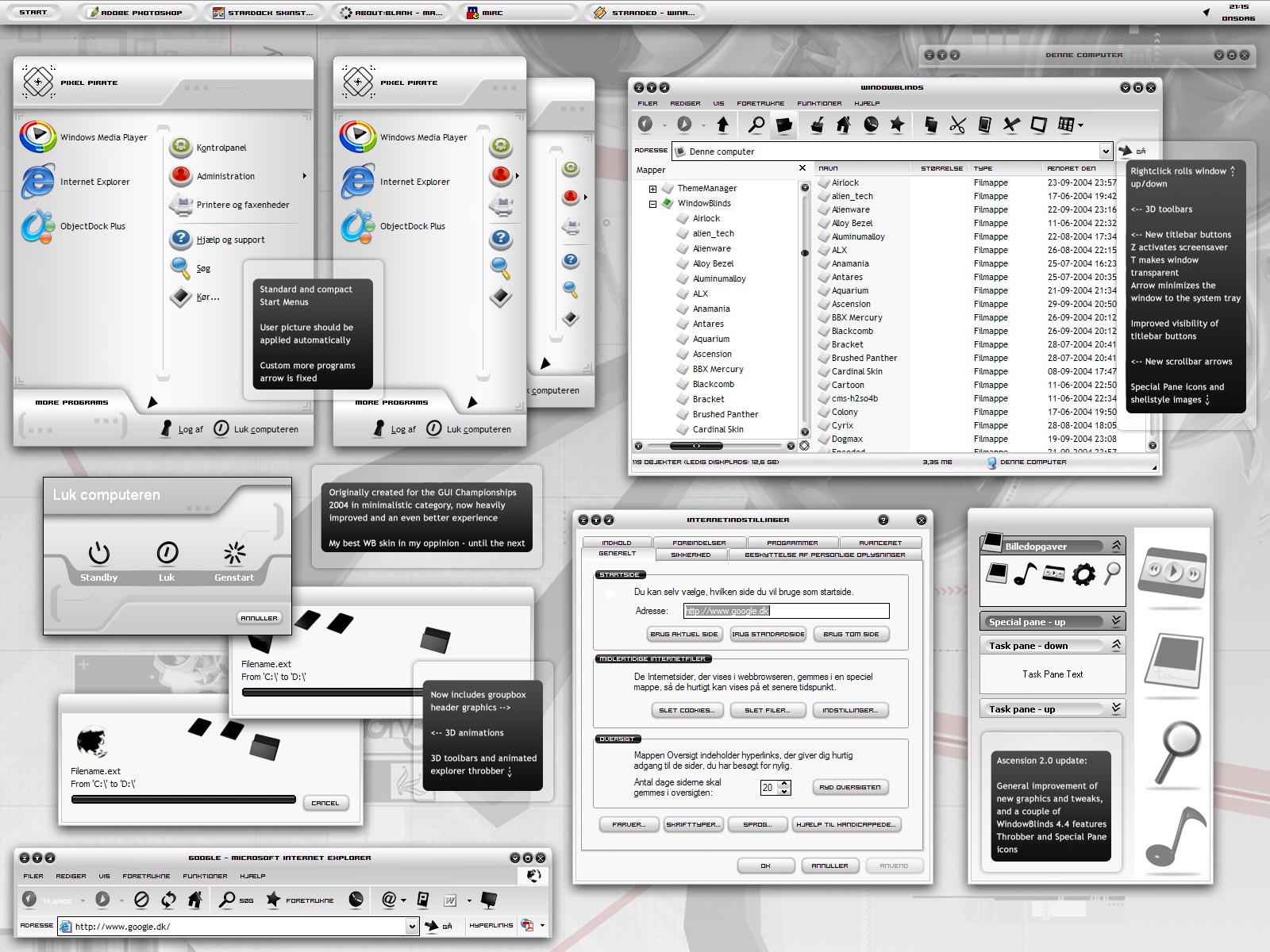
Pele12 that's because you're using small icons in your start menu. I made the compact style for large icons. You could overcome this issue simply by adjusting the width of the start menu in SkinStudio (userpane). The sizing margins have been set so it resizes properly.
TN Brat! - I'll consider adding it as a subsyle - but know that I think this update is way better than the original, so adding it might ruin it a bit for me...
gymenii - happen to be french? The more programs is as far as I know an OS language issue.
Thanks Yrgal, Chuckf1, danilloOc, joeKnowledge - estimatedprophet9 - I'll dig up a link for you.
nato1099 - the font used in the aero description fields is Trebuchet MS (also used some places in Windows) otherwise it's hooge.
TN Brat! - I'll consider adding it as a subsyle - but know that I think this update is way better than the original, so adding it might ruin it a bit for me...
gymenii - happen to be french? The more programs is as far as I know an OS language issue.
Thanks Yrgal, Chuckf1, danilloOc, joeKnowledge - estimatedprophet9 - I'll dig up a link for you.
nato1099 - the font used in the aero description fields is Trebuchet MS (also used some places in Windows) otherwise it's hooge.
PixelPirate
Comment #48 Thursday, September 30, 2004 3:41 AM
Comment #48 Thursday, September 30, 2004 3:41 AM
Now I come to think of it, I probably have to add yet another compact substyle for small icons, I have to edit the places list to do that, not like I suggested below...ooopsiedaysie
sketchers
Comment #49 Thursday, September 30, 2004 4:53 AM
Comment #49 Thursday, September 30, 2004 4:53 AM
This looks great. Before I download, do I have to have WB 4.4 to run this, or will it work with 4.3?
Thanks.
M
http://www.msketchley.pwp.blueyonder.co.uk/
Thanks.
M
http://www.msketchley.pwp.blueyonder.co.uk/
deesh
Comment #50 Thursday, September 30, 2004 5:36 AM
Comment #50 Thursday, September 30, 2004 5:36 AM
More Programs in not displaying correctly on my PC. It is not aligning correctly. How do I correct this with Skin Studio? Should I increase the value of Left?

BladeRnR10
Comment #52 Thursday, September 30, 2004 8:25 AM
Comment #52 Thursday, September 30, 2004 8:25 AM
Just when I thought WB's couldn't get any better you bring this update out to my favourite GUI Olympics Theme. This is just stunning, usable, sleek and - run out of adjectives  Also - finally a theme that doesn't have GIANT fonts as the default. This looks magnificent on a 1600*1200 desktop let me tell you (21" screen).
There is ONE critisism I have and that's the mouseover animations on the file explorer toolbar - they're a bit odd and detract from the theme. My suggestion (For what it's worth) is to simply inverse the image to white(ish) or just lighten the image.
Now all I need to do is find a Wallpaper that will compliment it. Somebody make some suggestions:D
BTW - Alloy Bezel Iconpackager theme matches perfectly with Ascension!
 Also - finally a theme that doesn't have GIANT fonts as the default. This looks magnificent on a 1600*1200 desktop let me tell you (21" screen).
There is ONE critisism I have and that's the mouseover animations on the file explorer toolbar - they're a bit odd and detract from the theme. My suggestion (For what it's worth) is to simply inverse the image to white(ish) or just lighten the image.
Now all I need to do is find a Wallpaper that will compliment it. Somebody make some suggestions:D
BTW - Alloy Bezel Iconpackager theme matches perfectly with Ascension!
PixelPirate
Comment #53 Thursday, September 30, 2004 9:23 AM
Comment #53 Thursday, September 30, 2004 9:23 AM
sketchers - it should run properly on 4.3 as well. I think it'll ignore the new code from 4.4 *.uis files.
deesh - In SS, left tree, Start Panel, more programs arrow - adjust the content margin to something else than -80.
Thanks Tiggz and BladeRnR10 - it sure does look nice on 1600x1200
deesh - In SS, left tree, Start Panel, more programs arrow - adjust the content margin to something else than -80.
Thanks Tiggz and BladeRnR10 - it sure does look nice on 1600x1200

AtticusCC04
Comment #54 Thursday, September 30, 2004 9:47 AM
Comment #54 Thursday, September 30, 2004 9:47 AM
this is awsome i love it but i am having one slight problem.....the progress bar like when i am download something it supposed to go up well....its just black there is nothing there.......whats da prob? 

AtticusCC04
Comment #55 Thursday, September 30, 2004 9:52 AM
Comment #55 Thursday, September 30, 2004 9:52 AM
its like that everywhere and i have WB 4.4 and all the progress things are black nothing happens.....heh.....
PixelPirate
Comment #56 Thursday, September 30, 2004 10:11 AM
Comment #56 Thursday, September 30, 2004 10:11 AM
HkmHrns2005 - that's a WB bug waiting to be fixed.
estimatedprophet9 - you can find the wall here: http://computerologist.org/walls/eventuality1600.jpg Now you're there check out the rest too.
estimatedprophet9 - you can find the wall here: http://computerologist.org/walls/eventuality1600.jpg Now you're there check out the rest too.
alphabyte
Comment #57 Thursday, September 30, 2004 10:16 AM

Comment #57 Thursday, September 30, 2004 10:16 AM
Very nice, high-contrast skin. Great work!
AtticusCC04
Comment #58 Thursday, September 30, 2004 10:30 AM
Comment #58 Thursday, September 30, 2004 10:30 AM
Ah ok that's cool....like i said b4 awsome great skin one of my favs! 

AtticusCC04
Comment #59 Thursday, September 30, 2004 10:32 AM
Comment #59 Thursday, September 30, 2004 10:32 AM
and forgot to say holy cow the walls are saweeeeT!
Josephs
Comment #60 Thursday, September 30, 2004 11:35 AM

Comment #60 Thursday, September 30, 2004 11:35 AM
Nice skin man... wd
But I got a problem. For some reason my Progress Loader comes up as black. So I can't tell what percentage is loaded of whatever it is I am loading
:INSERTIMG(C:\Documents and Settings\Josephs\Desktop\Progress loader 2.jpg):
What can I do... or you do?
But I got a problem. For some reason my Progress Loader comes up as black. So I can't tell what percentage is loaded of whatever it is I am loading
:INSERTIMG(C:\Documents and Settings\Josephs\Desktop\Progress loader 2.jpg):
What can I do... or you do?
Please login to comment and/or vote for this skin.
Welcome Guest! Please take the time to register with us.
There are many great features available to you once you register, including:
- Richer content, access to many features that are disabled for guests like commenting on the forums and downloading files.
- Access to a great community, with a massive database of many, many areas of interest.
- Access to contests & subscription offers like exclusive emails.
- It's simple, and FREE!
|
|
Page 3 of 5 | |
|
|---|





Comment #41 Wednesday, September 29, 2004 7:27 PM
It was one of the best in the GUIO, and even better now. The toolbar icons & animations are simly awesome. Great update!