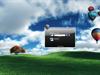
Serenity Bay
Average Rating: 10
Yours: -1
File Size: 1.8MB
Downloads Today: 0 Downloads Total: 3416

Serenity Bay

Updated May 02, 2008 by Cavan1


Cavan1
Comment #1 Friday, May 2, 2008 2:52 PM
For the best look at lower res; browse to logon folder, C:\Program Files\WinCustomize\LogonStudio\Serenity Bay, open UIFILE in text editor, look for following line element id=atom(contentcontainer0) layout=filllayout() layoutpos=client content=rcbmp(100,3,#0,1280,864,1,0) if editor has line numbers it is 543. The bold values, 1280 and 864 set pic width and height, change them to your res width and height minus 160 on height. This is to accommodate the top and bottom bars. Example; for 1024x768 res change values to 1024 and 608 (768-160). From feedback from a couple members this will work going up to higher res.
Richard Mohler
Comment #2 Friday, May 2, 2008 5:13 PM
Very nice..
Cavan1
Comment #3 Friday, May 2, 2008 5:34 PM
Thanks Richard.

Please login to comment and/or vote for this skin.

Welcome Guest! Please take the time to register with us.
There are many great features available to you once you register, including:

  • Richer content, access to many features that are disabled for guests like commenting on the forums and downloading files.
  • Access to a great community, with a massive database of many, many areas of interest.
  • Access to contests & subscription offers like exclusive emails.
  • It's simple, and FREE!
Downloads remaining: 5
User Level: Visitor

Featured LogonStudio XP

Popular LogonStudio XP

Top LogonStudio XP Skinners

Yesterday  |   Last 30 Days  |   All Time
1. Cavan1 377
2. Stramp 321
3. Mike56 271
4. orionshope 260
5. Alperium 210
6. Double Zero 177
7. boss0190 173
8. sabrewolf06 134
9. Johnnygnote 127
10. Road_Kill 124
11. Velvetelle 119
12. Apocalypse_67 115
13. Bushman 114
14. adni18 113
15. twocool 110


web-wc01