











Twilight of the Arnor is coming
Monday, April 21, 2008 by Frogboy | Discussion: PC Gaming

Stardock is pleased to announce that Galactic Civilizations II: Twilight of the Arnor has gone into final gamma testing. The expansion pack to the critically acclaimed space strategy game, Galactic Civilizations II: Dread Lords, completes the Dread Lord saga with the return of the powerful Precursor civilization, the Arnor.
Arguably the most comprehensive expansion pack in strategy game history, Galactic Civilizations II: Twilight of the Arnor has more new features and content than Galactic Civilizations II had over the original.
A labor of love, Twilight of the Arnor is nearly complete. This week, we are putting it through final gamma testing as lots of content and goodies that were held back during the public beta are integrated in, tested, polished, etc.
Amongst the new features includes unique technology trees for each of the 12 major civilizations. This also means unique weapons, ships, planetary improvements, and much more for each civilization. This has allowed us to greatly expand the story of each civilization. Moreover, a new victory condition has been added called Ascension in which players can take control of the Ascension crystals (introduced in the campaign) for victory. The graphics of Twilight of the Arnor have been completely revamped to bring the game's visuals to 2008 standards. Check out the screenshot below to get an idea.
We have set the launch date to be April 30th (late afternoon Eastern Standard Time) for the digital release. Twilight of the Arnor does require the first expansion pack (Dark Avatar) to run. A bundle of the entire saga is available at a discount. The final expansion pack to the most highly rated space-strategy game of all time is nearly here...

The Graphics Difference:
 vs.
vs. 
April 21st Skin Thoughts and Reviews
Monday, April 21, 2008 by wulfn1 | Discussion: Community
One of the things I want to stress prior to continuing this article, is , there are some elderly skins that seriously dislike new technology. It is with a stern warning to back up your stuff first, I give you this week's reviews.
Having said that, I want to tell you there are some really neat skins in the libraries that no one see's anymore.Some of those skins will work just fine on your system with the newest windowblinds build. (I also warn, I have XP sp2 , don't know what happens on Vista). Though if you go beyond 2000, you'll find skins listed as uis1 these will NOT work with your current version.
So having said that , I travelled through time this past week and uncovered some treasures I thought I'd share with you .
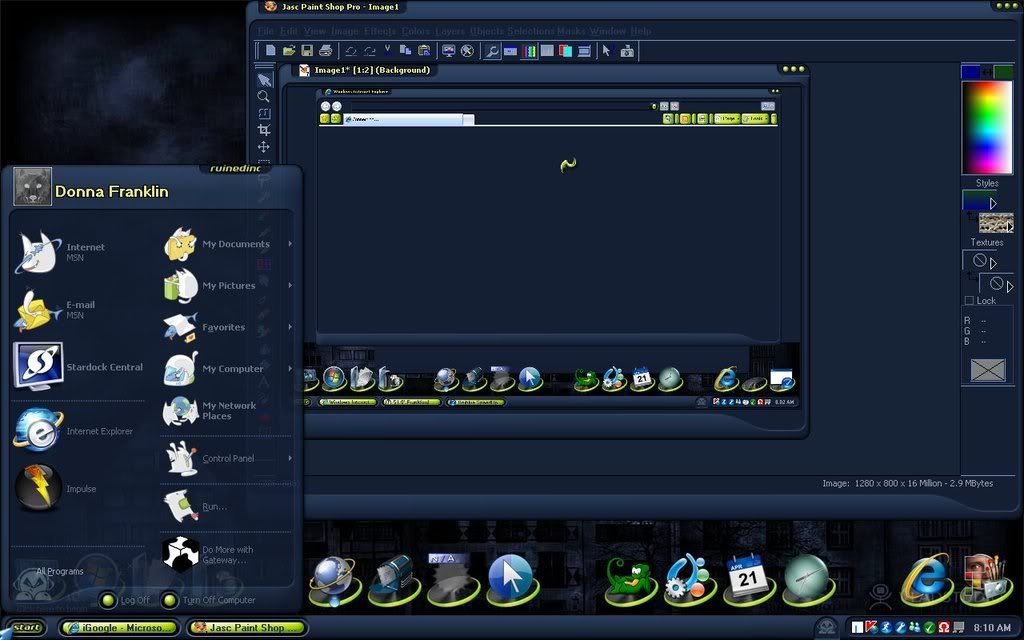
One of Blinds I downloaded was ruinedinc vr2 all ruinedinc stuff here , by ruined%20inc. This blind is a real treasure to those of us who have difficulty viewing some text in other blinds. It's a "lumpy" high contrast dark skin, with light text on dark background. The colors are a bit out of the ordinary, Midnight blue and Neon green. I paired it with the Vista Glass tiles dock background which has the identical color borders.(thank you wizard1956 for the tip!) This skin just begged for a vlad wall. I had to oblige! I chose Cant sleep by vlad can be found here Shrek Cursors by Benjiman cursor found here seemed to fit the blind to a Tee. Mrnomust by thinkcear worked the best for me with this blind. It's simple and cartoony and the colors blend nicely.
When you're using an elderly blind, some of the transparency features are lost. Thankfully, this one still has a transparency so all is not lost by using old.
Have you tried any of the older skins by ^^Gabriel?
If not you should! They are minimalistic, sleek and run fast on systems even with minimal ram. I dragged out an oldie but goodie today just for fun and my computer wore x360 by ^^Gabriel. I chose the fun but simple IP to go with it Mrnomust by thinkcear. Again the cartoony style and flat look compliments this skin nicely.(who'da thunk it! ) I played for a while with different cursor packs and chose platinum by stardock design for it's simple sleek style. It really works well with this skin.
Some skins that are Vista only are meant to be Vista only. Case in point, KittyMalone's (now called Jeckyll!) Rise of the Mezanine. I love Kitty's Goth skins, they really speak to my darker side, and I decided I had to try this last skin. Well, it doesn't like XP at all, sad too because I really love the "please wait" medallion. It hinted at a really well detailed skin.
But xp hates it and breaks the start menu in wierd ways. I had to uninstall this one so I wouldn't use it again. *Thankfully Kitty took pity on us XP users there is an xp version so we can use it too. Of course I didn't know this at the time and was bummed out.* ( I will include in next week's reviews the MezanineXP skin)
To make myself feel better, I opened Kitty's Wednesdays nightmare skin. I did feel better !! Though it's a bit purple-y to me, the graphics are really detailed and fun. cjshadow_ghost by cjshadow IP package really likes this WB and plays well with it, making the Goth theme look sweet. I used the cursor azul3d by the AVMAN recolored to match the skin.I wanted something that looked caged and that cursor fit the bill. I also tried Blade 50 by Rycher it had that goth feel to it that complimented the skin, though the I bar really didn't suit me as it changed bright colors.
For the wall, I used pollen by inception8 , recolored to match the colorscheme. Also looked ok greyscaled.
This is another of the skins I have that doesn't work well with my hourly wallpaper change , as many of my walls don't look as nice with it.
I apologise for the lack of links and screenies beyond the first review. I had already written up the others and at that time didn't have a screen shot or all the links for those skins. I promise to do better next review!
This Week in Skinning - April 18th
Skin Roundup for 4-18-08
Friday, April 18, 2008 by Island Dog | Discussion: OS Customization
Friday is finally here, and it took way too long to get here. I'm starting to see a slight slowdown in skins, so I hope that is just something temporary.
Now for this weeks picks!
|
|
Maja Pearl CXP for CursorFX by Xiandi Xiandi gives us another great looking cursor theme this week. Great job. |
|
|
Rogue Proton Meters in DesktopX Widgets by philmar83 Here is a set of meters that are made to match the very popular Rogue Proton WindowBlinds skin. |
|
|
Aphrodite's Necklace in Dreams by TheMasterBaron This is another unique, but beautiful .dream from TheMasterBaron. Be sure to download this one. |
|
|
MB-AesTeK for IconPackager by ModBlackmoon Icon packs are starting to roll in again, and here is another fantastic addition by ModBlackmoon. |
|
|
Conspiracy My Computer in ObjectDock Icons by J. Aroche This is a new series J. Aroche is working on, and I can say it's off to a great start. Check the galleries for more of this series. |
|
|
The Lighthouse in Wallpapers |
|
|
Underwater 4 in Wallpapers by vlad This wallpaper looks so good on the desktop. I really would like to see something like this as a .dream. |
 |
Rogue Proton G for WindowBlinds by I.R. Brainiac You should know what to expect from an I.R. Brainiac skin....nothing but pure creativity. This XP skin has several colors available, and several matching accessories as well. |


Be sure to check the skinners personal sites on WinCustomize for more of their works. Great job to everyone who submitted work this week. See you next week!
April 17 Skins reviews
Some looks that I've tried this week
Thursday, April 17, 2008 by wulfn1 | Discussion: Community
Here are a few of the skins I've tried in the last week. I've documented them each day I used and saved the information to post to you here in one lump sum.
Well I felt kind of beachy today. It's sunny and I live close to the beach, and I can smell the salt in the air today. Very invigorating!
I decided today I was going to hunt through my skins for something I've already downloaded, and found seadream by Cathe Well Iconpackager was having some issues and I figured I'd redownload the package and freshen up a bit. I was dissapointed to find that the package is no longer available!! It was a cute little theme , with beach toys in a nice ocean blue , sunny yellow and keylime green hue. Well, I was going to tell you how well this package works with Sequel , by navigatsio. But since its no longer available, and my IP is acting up, things have changed.
Sequel is pretty all the way through, as navigatsio skinned all the menus to have a button look, this looks sharp on my computer and reminds me of some of the nextstart ( or was it nextstep?)menus I liked when I first started skinning my computer. It makes the list look like individual items instead of a long line of text to slog thru finding what you are looking for.
For the cursor, I had used microzoa by chuckeye for cursorfx. The colors work well with this grouping, and the animations are really detailed. Though it does get confusing sometimes when the little bugger turns upside down while trying to click on something, you have to get your bearings all over again.
Now , because of the missing IP , I had to redo and find a nice beachy IP package to go with this grouping. So I slogged through the IP libraries on WC and found Bluewhales by nichoLU. its also a cute theme and works well with the other skins I'm using, but I wish the original package I chose was still available!! I chose the Beachy sound package by k10w3 to go with the look. Beachy needs more sounds though. It almost seems like it didn't get finished. all in all, I just needed waves and sun tan lotion to complete the feel!
Goes to show you , if you download alot, back stuff up!! you never know when you have to reinstall something that isn't available anymore.
oh well, see ya tomorrow!
Wulf
With all the things I've been reading lately about Rogue Proton by I.R.Braniac , I just had to find out for myself. I had downloaded the original and used it for a week to see how it "felt", well I found it not to my tastes. So I decided to give this updated skin a second look and am glad I did, while it's not my usual taste, it worked well with the grouping I created.
I loaded the lime substyle , and I paired it with a quirky IP called Secret Garden by KerLoong, Looks quite cool! I Found that protozoa again by chuckeye works pretty good with this color scheme and skin style. Only drawback is it's size, it's a large cursor, but fits with the large style skin.
I found some greenish walls that I had and selected them for my change wallpaper themes, Those skins are , Pollen by inceptiona8, Pirate treasure by atomnet, Hear The Full Moon by tammitatum (this one I just really liked the dark moon look.),and Creamware by boxxi.
I chose those walls because of the similar colors and compliments they give the rogue proton WB. I have to say it was a pain to have to re click every single wall in my WB wall changer, but the look really needed it. Maybe for future builds the creators will consider modifying that feature for easier selection. (I have walls for different seasonal holidays and such that don't always get selected.)
Though this is a very dark skin, I have found that it doesn't cause problems trying to view things , like some dark skins do. The backgrounds for text are just light enough to be easily readable. If you like dark skins, this one isn't bad at all, and the substyles have some nifty rich jewelcolored looks. Something that can actually be made slightly girly if you like, or quirky , like I like! I used sounds of the rainforest by robjk which gave it a nice earthy feel.
I'll let ya know what I find next.
Wulf
Tried Nutshell by thewer today. I like the color combination , except the text areas are very dark and difficult to see, but over all very pretty, rich looking. Really liked the left hand buttons on the window frames! nice to see something out of the ordinary.
I used the MUKU icons by celldrifter. You would have thought I would go strictly with wood look since it's a wood skin , but wood looked kind of boring. The Muku look is very asian and simple. I used a simple wall of a tree leaf xrayed, so it was a black n grey look. Very nice compliment. I did use Wooden Claw by TOMCpl for my cursorFx because it fit so well with the theme.
while there are several really nice wood look object dock backgrounds, I wanted to stick with the asian theme so I opted for tile Woody by jimmyyy . I used wood5 tiles, they have a dark wood disk, surrounded by what looks like black laquer. Very sleek.
All in all, I would love this WB if it weren't for the fact that things show up so dark in all the text boxes.If you like this style, you'll have to mess with the windowblinds settings to get the text areas to come up a little. I added Ambient echoes by robjk for my sound packager. works pretty good.
See ya next time,
Wulf
I tried out the Dark Knight blind by Dr Zeus, though it reminded me of a halloween blind or a batman fan blind, I figured I should download it just in case I forgot about it come halloween time. I like the colors and the textures used in this blind, though I was sorry that the pretty copper color that the "please wait" screen's bat had , wasn't a part of the blind itself.
The bats are a gold color which is also pretty but I think it would have been much prettier with the copper. There are parts of the blind that show just black, making it look less than perfect, but they don't distract from the whole unless you have your start menu open all the time. Wierd thing (I used the xp and the vista . both had this problem) the tray at the bottom right only had the time in it, all the other icons dissapeared. while this is very pretty, I wish there were a way of making them show when you want them to,... like maybe a mouse over feature. Because I was just trying it out, I didn't match icons and cursors to it. Maybe I'll do that at halloween.
Wulf
Managing Social Networks
Wednesday, April 16, 2008 by Island Dog | Discussion: Internet
If you spend any amount of time on the Internet then I would probably bet you have be subjected to some form of talk about social networks. Heck, even here on WinCustomize and JoeUser I regularly talk about the usefulness of such networks. We have a growing group on Facebook about desktop customization, and several of us use Twitter as well.
With all these current networks, and more popping up all the time, it can be difficult to keep track of them all. I use quite a few of these networks for both personal and work use, and I wanted to share a few tips on how I manage some of the more popular ones.
- FriendFeed is one of the hottest new sites around, and it's generating quite a buzz. FriendFeed lets you keep update to date with the happening of all your subscribed friends, favorite bloggers, etc. It will pull updates from services like Flickr, Twitter, YouTube, Digg, and a bunch more. It also allows users to comment on your postings, and see updates posted from your friends as well. You can see my feed here.
- Socialthing! is another website that does a similar function, but I think it has a much cleaner interface. Socialting! is still an invite only service, and I do have a couple of invites to give away if anyone is interested.
- TweetScan is for you Twitter users out there. It lets you search Twitter, and is a good way to find people with similar interests, or people that are just talking about you.
- Twhirl is an application powered by Adobe AIR. It's a Twitter client for your desktop, but the cool thing about this is it will also post to your Pownce and Jaiku accounts as well. It's also available for both PC and Mac, but my personal Twitter client of choice is Witty.
- Alert Thingy is another new application also powered by Adobe AIR. Instead of Twitter, this app focuses on keeping you updated of your FriendFeed feeds, and it also allows you to post messages to Twitter.
So those are a few of my top choices on how to make managing your social networks a little bit easier. If you have any tips or tricks, I would definitely like to hear how you manage yours.
Gnomedex: The $600 Blogger Conference!
I'm poor :(
Wednesday, April 16, 2008 by Zoomba | Discussion: Virtual Communities
 Now, I'll admit that I'm definitely on the outside looking in of the blogging/web 2.0 community. While I manage very large sites with a ton of users and reach, I'm still on the periphery. Why? Well, I live in Michigan. Not exactly a state known for it's thriving IT industry. If you go beyond IT services that support manufacturing companies, you can probably count on one hand the number of companies doing anything significant with online communities or digital media.
Yes, I'm a bit of a victim of geography here, and even though it's all online now, it's all IM, Twitter, email and blogging, proximity is still important. So when I see events like Gnomedex coming up, I'm interested because it could be one of the few opportunities I have this year to actually network with other people working in my field. And in this nebulous profession, professional networking is king.
Gnomedex struck me as an interesting conference to attend with its focus on blogging, podcasting and other personal media, the stuff that's really sweeping the 'net at the moment. The really interesting tech and approach to information distribution that will become pretty standard for regular users in 5 years is what this conference focuses on now. And there are some pretty impressive names attached too, with folks from CNN, Amazon's AWS initiative, Google and a selection of people to know around the blogging world.
I'd love to go. It would be a wonderful opportunity to meet people, get some new ideas for JoeUser/WinCustomize/ImpulseDriven. Plus I think it would be a blast.
But I won't be going. Why?
It costs a damn fortune!
The conference, just to get in the door, costs $600 (if you've attended a Gnomedex in the past, you get a $50 discount). Now, that's a pretty hefty price to begin with, but what if you're from out of town? Well, then you have to factor in plane tickets and a hotel. I just did some quick checking via travelocity, and looked over the hotel list close enough to the conference so I wouldn't have to rent a car...
Leave August 21st, return August 23rd:
- Plane Ticket: $373
- Hotel: $389 (before tax, this was one of the cheap ones)
That brings the base cost of the conference to $1,362. Funny enough, that's how much I paid in taxes this year.
Unfortunately this doesn't include the incidental costs like dinners, drinks with folks you meet at the conference, or anything you may need to pick up while there. From what I've been told about Seattle, and about these sorts of conferences, I could probably safely add another $300 or so to the bill. So now at a conservative estimate I've passed $1,600.
Of course I could do things like find someone to split a hotel room with, and probably just not do the dinner/drinks thing, but after a point the cost cutting gets in the way of what these conferences are about: meeting folks in the field.
I could probably swallow the travel costs if the conference pass didn't virtually double the cost. It almost seems like the pricing is setup to keep out people who aren't either on that side of the country already, or who don't have a corporate card to cover the costs.
Maybe someday there will be a tech conference here in the midwest....
Yeah, right.
Jing 1.5 (Windows)
Wednesday, April 16, 2008 by Island Dog | Discussion: Windows Software
I have talked about Jing before, and it's one of my favorite free apps for capturing screenshots and video of your desktop. TechSmith released an updated version for Windows users yesterday.
Updates include:
- Capture selection should start more quickly
- History should be open more quickly
- Memory 'leaks' cleaned up
- Over all memory usage decreased
- Automatic selection of 'sub windows' restored
Download: Jing 1.5
MyColors: Introduction Walkthrough
Change your desktop with MyColors from Stardock
Monday, April 14, 2008 by Island Dog | Discussion: Customization Software
MyColors from Stardock is something you probably have been reading a lot about recently. The new MyColors Theme Manager has a slick new interface, and should now work seamlessly with other customization components such as Object Desktop. A question I am often asked is..."what is the difference between MyColors and something like WindowBlinds?"
Well are are some fundamental differences, but remember that MyColors uses the technology from products like WindowBlinds and IconPackager. The real big difference is MyColors is basically an all-in-one solution for customizing your desktop. Whereas with applications like WindowBlinds and IconPackager, you use each application independently and pick and choose the themes and skins you want to use. This is not a bad thing at all, but MyColors offers an ease of use, especially for people who do not want to have to install multiple pieces of software to personalize their desktop, or are not that familiar with desktop customization.
MyColors includes all the skinning technology, so all you have to worry about is which themes you want to use. MyColors themes typically include a new visual style, icon package, wallpapers, and several gadgets like media players and weather displays.
|
|
|
MyColors Theme Manager |

You can check out MyColors by downloading the MyColors Theme Manager with the free Quest theme. As you see in the screenshot above, MyColors has an easy to use interface which shows you a list of your installed themes, and a large preview area where you can apply the selected theme in your list.
To add a new theme to MyColors simply click the "Add Registration" button, and enter your e-mail and registration code in the box seen in the screenshot below. You can get new themes by browsing the MyColors library. Once entered, your new theme should show up in your list.
|
|
|
Adding registrations to MyColors |

Need more skins? Not a problem. Click the "More Themes" tab and browse some of the sample themes, or click the "View More" button and that will open a link to the full gallery page where you can choose from the many themes that are available. There are themes that are licensed by the NBA, NHL, and Collegiate sports teams. In addition there are holiday, automotive, and "Inspired" themes for you to choose from.
|
|
|
MyColors "More Themes" |

If you need to return to the default Windows desktop, it's as simple as selecting Windows Desktop in the list and applying it.
One of the best features about MyColors is it will notify you, and automatically update both your MyColors theme manager, and the installed themes. So if there is an application update, or a fix or addition to a theme, MyColors will update it for you. Best of all, MyColors is based on years of desktop customization technology, and does not hack or patch your system files, so you don't have to worry about your themes not working when Windows updates are installed.
|
|
|
MyColors Aquamarine Theme |

For more information on how to easily transform your desktop into how you want it to look and feel, then visit the MyColors web site.
Link: MyColors
This Week in Skinning - April 11th
Skin Roundup for 4-11-08
Friday, April 11, 2008 by Island Dog | Discussion: Community
If you haven't seen it already, go check out the latest edition of This Month in Dreams.
Now for this weeks picks!
|
|
Organic for CursorFX by Xiandi The last few weeks I have been featuring several different skins from the Organic series, and this week we have another stunning addition. I hope a WB skin is in the works. |
|
|
Sunny Beach in Dreams by AlexMorgan This is another Crysis based .dream, but I especially like this one as it has a day and night version. |
|
|
Mulberry for IconPackager by Jennifer Chang These are really nice icons. There are only 15 folder icons included, but I hope she plans a complete package of these. |
|
|
Metal Glass for ObjectDock Backgrounds by Mirsguy This is a great mix of metal and glass for a great set of dock backgrounds. |
|
|
Approach of the Dark Planet in Wallpapers by DEVJIT This is a really nice wallpaper, that caught the eye of a few of us last night. Great work. |
|
|
Things of somesort in Wallpapers by ahabkaba This is just a really cool wallpaper, almost more of an art piece. Fantastic work on this. |
 |
White System ver1.0 for WindowBlinds by 1MrPAul1 This is a nice and clean skin, which as the author says, is good for everyday use. |


Thanks to all the artists for their work this week, and a special thanks to Elvee, Tim, ShelbyGT, and others in IRC #stardock last night who helped pick a few of these. See you next week!
Object Desktop 2008 Screencast
Thursday, April 10, 2008 by Island Dog | Discussion: OS Customization
Object Desktop 2008 was just released, so I created a screencast which walks you through what is included with both Object Desktop 2008, and Object Desktop 2008 Ultimate. Each application gets a brief overview, along with a look at Impulse. This is great for anyone who might not be too familiar with the popular applications that are included.
Link: Object Desktop 2008 Guided Tour