


















































Put Animated Snowflakes on Your Desktop with DeskScapes
Monday, December 6, 2010 by Island Dog | Discussion: Personal Computing
Winter is pretty much here, and although some of you may be experiencing real snowflakes outside, maybe you would also like to enjoy some animated snowflakes on your desktop. DeskScapes 3 has a Snow effect that puts animated snow falling on your desktop. Just select it from the Effects tab, and any wallpaper you are using will have a really cool snow effect added!
Get DeskScapes - https://www.stardock.com/products/deskscapes/


Fences Pro Updated to v1.1
Tuesday, November 30, 2010 by Island Dog | Discussion: Personal Computing
Fences is the widely popular application from Stardock that helps you wrangle up those icons spread out all over your desktop. The v1.1 update for Fences Pro is out today with various fixes and improvements.
- Added ability to toggle hidden fences at startup
- Added "Hide shortcut arrows on desktop icons" to Appearance tab
- Reliability improvements based on user feedback
- Numerous small UI tweaks
- Improved multimonitor support
- Icons no longer have risk of falling out of their fence on F5 and/or monitor resize
- Fixed flicker when moving a fence behind the taskbar on Win7
- Fixed issue where new icons could become "stranded" until interacted with, particularly on XP
- Fixed issue where moving Fences beneath the bottom of the screen exhibited odd behavior
- Improved "Disable Fences" functionality
- Fences now "come to the front" when moved. Fixes behavior where you could move a Fence behind another and then lose access to it.
Current users can update via Impulse. More information about Fences can be found at its website.
https://www.stardock.com/products/fences/index.asp

ObjectDock Nears 10 Million Downloads on Download.com
Monday, November 29, 2010 by Island Dog | Discussion: Personal Computing
ObjectDock is one of the most popular desktop applications out there today. Its functionality, ease of use, and variety of downloadable themes gives it an edge you won’t find with any other similar application. As of today, ObjectDock has been downloaded over 9.7 million times on the popular Download.com website. As we approach the 10 million mark, this is an amazing amount of downloads and look forward to millions more!

The Impulse Thanksgiving Sale!
Friday, November 19, 2010 by Island Dog | Discussion: Personal Computing

The big Impulse Thanksgiving Sale starts today and runs throughout the Thanksgiving holiday next week. This is a fantastic sale on both PC games and desktop applications, so there is something for everyone!
A few highlights from the sale:
- Grand Ages Rome Gold Edition – $7.49
- S.T.A.L.K.E.R. Bundle Pack – $9.99
- Tropico 3 – $7.49
- Sword of the Stars - Complete Collection – $14.99
- The Settlers 7: Paths to a Kingdom™ – $24.99
- Star Trek Online – $9.99
- Dark Void – $9.99
- The Political Machine 2008 – $2.99
- IconDeveloper – $1.99
- DeskScapes 3 – $14.96
WindowFX 4–Inactive Windows Video
Wednesday, November 17, 2010 by Island Dog | Discussion: Personal Computing
This is a demo video showing off some examples of the Inactive Window features in WindowFX 4.
https://www.stardock.com/products/windowfx/

WindowFX 4–Window Management Video
Tuesday, November 16, 2010 by Island Dog | Discussion: Personal Computing
This is a demo video showing off some examples of the Window Management features in WindowFX 4.
https://www.stardock.com/products/windowfx/

What’s New in WindowBlinds 7
Friday, November 12, 2010 by Island Dog | Discussion: Personal Computing
WindowBlinds is no doubt the tool you need to change the look and feel of Windows, and has been for quite a while. There are still many out there still using an earlier version and for whatever reason have not made the jump to upgrade yet. Along with tweaks and performance improvements, WindowBlinds 7 has many new features that is well worth the upgrade.
Lets take a look!
Aero Skinning
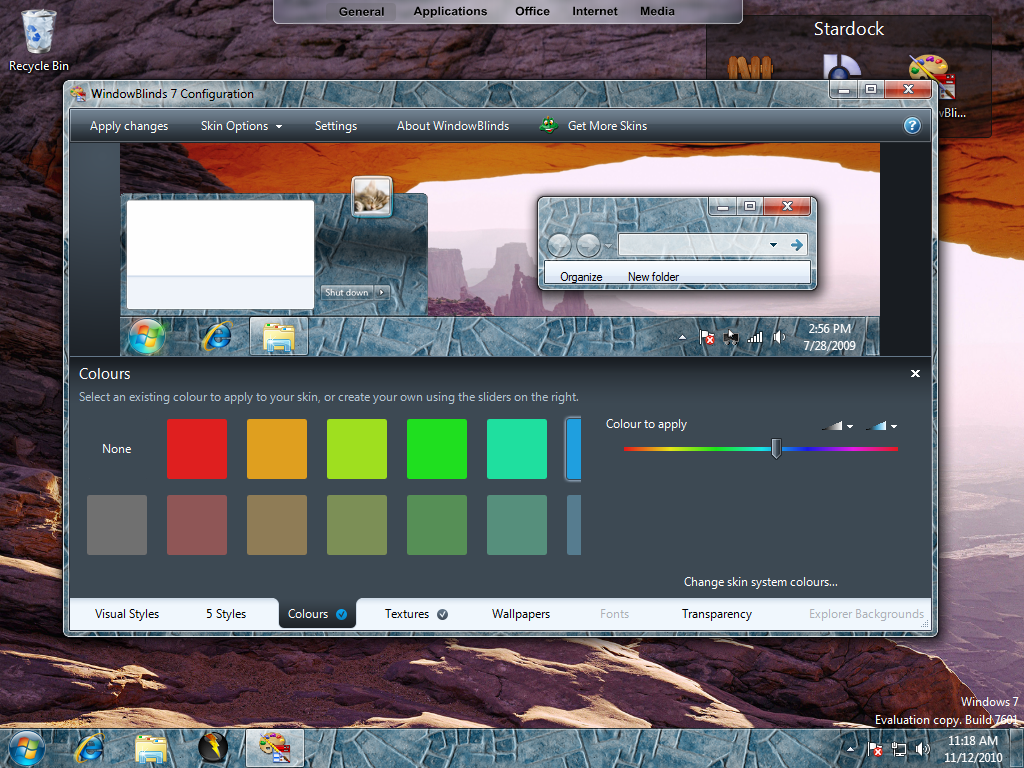
WindowBlinds will obviously change the entire theme of Windows, but maybe you just want a little change to the basic Aero look of Windows. Using textures and coloring, you can customize Aero more to your liking.
Textures
As mentioned before, textures can be used to modify Aero, but you can also apply them to any other skin that you like. Many textures are included with WindowBlinds, and you can also download more or even create your own to use and share.

New User Interface
WindowBlinds 7 also has a completely new user interface. It is even easier to navigate and has a new tab design allowing you to access features even faster!

Windows 7 Support
WindowBlinds 7 was built with Windows 7 in mind, and takes advantage of features included in Microsoft latest operating system.

Enhanced Coloring
Recoloring is not new in WB7, but it has received lots of attention to make it even better! There are thousands of skins out there to download, but if the one design you like doesn’t fit your wallpaper for instance, you can easily recolor the skin to match.
 |  |
Here is a demo video for WindowBlinds 7:

For more information about WindowBlinds 7, visit www.windowblinds.net.
Complete Control Over Your Windows Icons With IconPackager 5
Tuesday, November 9, 2010 by Island Dog | Discussion: Personal Computing
Windows has a ton of icons of icons in it, and for the most part they are plain and have kept the same basic design principles over the years. Icons are available all over the internet from sites like WinCustomize.com, but changing each individual icon can take a load of time, and who has that these days. In comes IconPackager 5. IconPackager is all about the icons, and it’s main feature is the ability to change nearly all the Windows icons at once! This is done by applying packs of icons instead of each icon individually. Not only does this save time, you have a package that is designed around one theme so your PC will have a stylish and classy look to it.
Changing the icons is simple. Just browse and choose the set you want, hit Apply and you have a whole new set of icons!

Of course if you want to change just a few icons at a time, you can also do that easily with IconPackager. Whether it’s changing an icon you just don’t like, or changing an icon to represent a special folder, you can do it with just a few clicks. IconPackager also integrates with the Windows shell so you can change icons from the right-click menu too.

If you like an icon package, but want to change it up a little to fit the colors of a wallpaper or theme, IconPackager has a coloring feature which allows you to do just that. There are also several built-in effect features for even more customization options.
 |  |
There are hundreds of icon packs available for you to choose from on WinCustomize.com. IconPackager also gives you the ability to create your own icon packs by simply dragging and dropping icons to the package builder. You can make your own custom icon packs in minutes!
More information about IconPackager can be found at its website.
https://www.stardock.com/products/iconpackager/
A free trial is available, and the full version is just $9.95.
10 Amazing Nature Wallpapers for Your Computer
Thursday, November 4, 2010 by Island Dog | Discussion: Personal Computing
Nature wallpapers are some of my favorites. These can either be real images or 3D rendered scenes of pretty much anything having to do with nature and the outdoors. They make a boring desktop turn exciting when you use a computer wallpaper like these.
1. Lost Paradise Night Version by DEVJIT

2. Autumn Walk by realityDream

3. Across The Great Divide by welshdragon

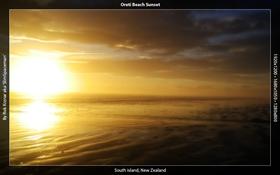
4. Oreti Beach Sunset by SlimSpaceman
5. Florida Sunflower by Island Dog


7. Autumn in Belgium by kenwas

8. Under the Tuscan Sun by Richard Mohler

9. Eclipse V. The fire arch by realityDream

10. What the Bees see by mkberry

IconPackager 5.1 Released
Wednesday, November 3, 2010 by Island Dog | Discussion: Personal Computing
IconPackager 5.1 was released today. IconPackager lets Windows users change hundreds of icons at a time using packages of icons. These packs of icons, which hundreds are available to download, can change nearly every Windows icon including all types of folder and file types. Integration with the Windows shell lets you easily change individual icons via the right-click menu, and IconPackager even supports Live Folder icons found in Vista/Win7. You can even create your own icon packs by dragging and dropping icons into the package builder!
The 5.1 update brings:
- Added support for Windows 7 Homegroup and shield overlays
- Icons & Cursors / Folders section will show custom libraries on Windows 7
- Added previewing all included icon sizes from the package preview window
IconPackager is available with a subscription to Object Desktop, or stand-alone for just $9.95. Free trial available.
https://www.stardock.com/products/iconpackager/index.asp
 |  |