


















































HP’s “Butterfly Lovers” Vivienne Tam PC with Stardock’s Fences and MyColors
Wednesday, May 12, 2010 by Island Dog | Discussion: Personal Computing
One of HP’s hottest new portable computers is the Vivienne Tam ‘Butterfly Lovers' HP Mini 210 Netbook. Along with fantastic hardware specs, the Mini 210 includes a Butterfly theme with a beautifully animated start menu courtesy of Stardock’s MyColors application. Another component of this Netbook is the inclusion of Stardock’s popular Fences software which helps keep a clean and organized desktop free of icon clutter.
Stardock is excited to have worked with HP on this project!

Multiple Monitor Wallpapers with DeskScapes
Wednesday, May 5, 2010 by Island Dog | Discussion: Personal Computing
One of my favorite features of DeskScapes 3 is its support for multi-monitor setups. With monitors becoming so cheap to buy now, it’s pretty common for people to have two or more monitors connected to their PC. I enjoy having different wallpapers on each monitor, and applying and managing those wallpapers on different monitors is much easier thanks to DeskScapes. If you need wallpapers for your desktop, don’t forget to check out WinCustomize for plenty of great ones.
The best part, is you can apply either animated wallpapers (.dreams) or static wallpapers, or a mix of them. Just open the DeskScapes interface, and select a wallpaper, and you will see the interface configured for multi-monitors.
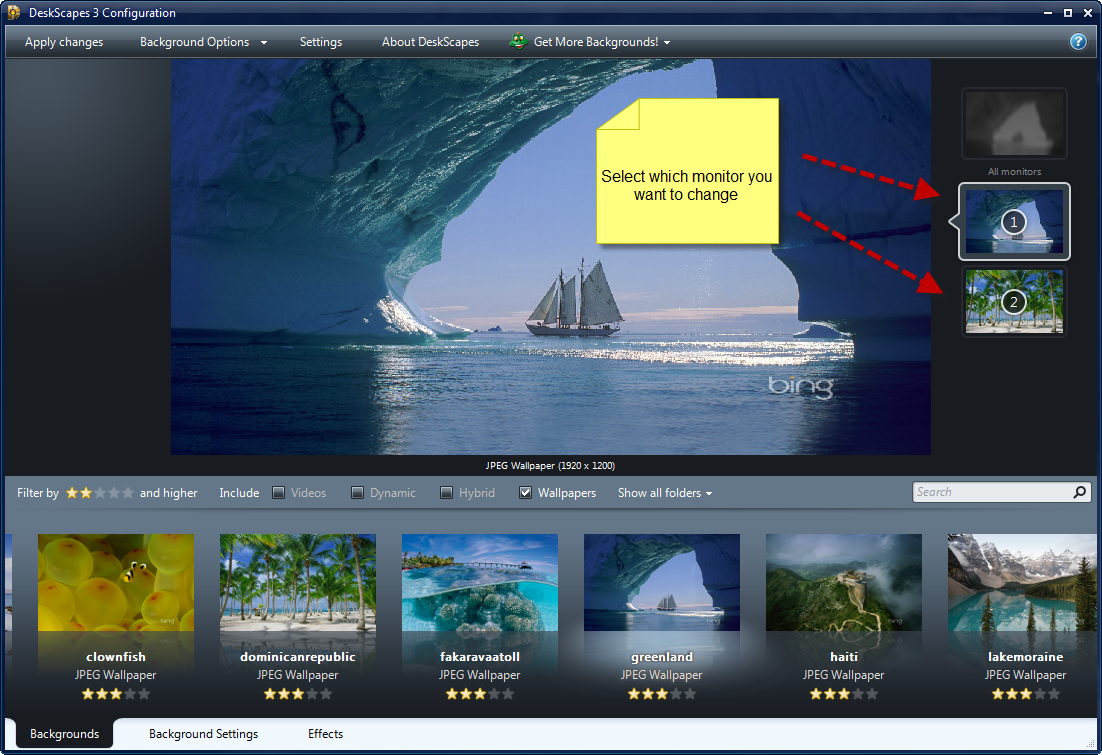

The interface is DeskScapes is easy to use. You can filter through the types of wallpapers you want displayed, and you can include specific folders for inclusion also. Of course this is just one feature of DeskScapes, lets not forget that DeskScapes is the the way to get animated wallpapers on your Windows desktop.
More info and a free trial download is available here.
Seeing Betas and Pre-Release Versions in Impulse
Tuesday, April 13, 2010 by Island Dog | Discussion: Personal Computing
With more people getting access to things like Elemental: War of Magic and the ObjectDock 2.0 beta, some are not aware how to see and download beta applications in Impulse.
Here is a quick rundown.

Then…

After that you should see any apps or games that you have access to. Grab Impulse now from www.impulsedriven.com and start grabbing some games and apps!
What Are Your Current Impressions of Windows 7?
Thursday, April 1, 2010 by Island Dog | Discussion: Personal Computing

So it’s been many months since Windows 7 was released to the public, and during my travels on the web, I have seen praise from so many people about how they are enjoying Windows 7. Some of these are even coming from Mac users which really should tell you something.
My experience has exceeded my initial expectations, and I enjoy using Windows 7 every single day. Performance has been outstanding on my main rig, which is obviously quite powerful, but I can say the same thing for my Acer Netbook which I also have Win7 installed on.

Obviously I run quite a few games and applications, and haven’t had one single issue with one, including older applications. On the customization side, having apps like Fences, ObjectDock, and WindowBlinds make the desktop experience that much better – especially in terms of organization.
Now that many of you have had quite a bit of time to use Windows 7, what are your current impressions so far?
ObjectDock 2 New Configuration Screens
Wednesday, March 31, 2010 by Island Dog | Discussion: Personal Computing
I wanted to take a few minutes and start posting some screenshots of the new configuration interface in ObjectDock 2.0. It’s very user-friendly, but in case you haven’t seen it yet, this will give you a good idea of what it does and looks like.


Tweak 7/Tweak Vista Updated Today
Wednesday, March 24, 2010 by Island Dog | Discussion: Personal Computing

Tweak 7 has been updated to v1.01, and Tweak Vista updated to v2.01. Both applications provide enhancements for their respected Operating System by helping configure it to meet your personal need by improving performance and behavior of Windows. They were designed for both the casual user users as well as power users to get get the most out of Windows Vista or Windows 7.
These latest updates bring:
- Added viewing details and integration for clearing cache/temp locations.
- Improved handling for process identification
- Fixes including service start/stop images and auto-logons on x64.
Existing users can download the updates via Stardock’s Impulse. Please visit the links below to get more information about Tweak 7 and Tweak Vista, along with links to free trial versions.
https://www.stardock.com/products/tweak7/
https://www.stardock.com/products/tweakvista/


Photoshop CS5 is Coming!
Wednesday, March 24, 2010 by Island Dog | Discussion: Personal Computing
We have been waiting a while to hear about “official” news about the release of CS5, especially in regards to Adobe Photoshop. This week Adobe has announced a countdown for the first look at the upcoming CS5.
On that page you can signup to take part in the introduction.
Adobe Labs have also released a video showing the new content-aware fill.

Why Do You Need Multiplicity?
Wednesday, March 10, 2010 by Island Dog | Discussion: Personal Computing
Multiplicity is one of the most useful and productive apps around today, and I like to share stories on how users can use MP to get more work done, and easier. To answer the question simply, it is because Multiplicity can make your work easier by eliminating the desktop clutter of multiple hardware, and by using the power of multiple PC’s with just one mouse/keyboard combination.
I was recently speaking with a guy who had a cool setup of three 24” widescreen monitors, each hooked up to their own PC. Of course the mess comes in because there are also three sets of keyboards and mice on the desktop making much clutter on what otherwise would be a clean, functional desktop. After showing a quick demo of Multiplicity they were sold, and the clutter on the desktop was eliminated and now they manage their media creation across three PC’s with just one mouse and keyboard.
If you have multiple-PC’s on your desktop, then I suggest giving Multiplicity a try, I’m confident you won’t be disappointed.
For a free trial and more information, visit www.multiplicity.net.

Impulse Weekly Roundup - February 26th
Friday, February 26, 2010 by Island Dog | Discussion: Personal Computing

It is just about time to strike February off the calendar, and we find ourselves getting closer and closer to summer. In case you missed it earlier in the week, ImpulseTV which debuted last week was updated this week with a couple of new episodes so be sure to check them out. We have also had a bunch of new releases on Impulse this week, so keep reading below to see what’s been added.
News and Articles:
- Elemental: Modding
- Unit design really demonstrates a key part of the economic system
- ImpulseTV Video Walkthrough
- Elemental Beta 1G Preview
- GamePro DRM Analysis, Interview with Brad Wardell
- Elemental BETA 1G: READ ME FIRST.
- WindowBlinds Feature Friday – Textures
- Impulse Weekly Top 10
New and Updated Releases on Impulse:
- Achtung Panzer – Kharkov 1943
- Dawn of Discovery – Gold Edition
- Dawn of Discovery – Venice
- Arsenal of Democracy: A Hearts of Iron Game
- Mercenaries 2: World in Flames
- Darkstar One
- Gratuitous Space Battles
Weekend Impulse Buys

ImpulseTV Video Walkthrough
Wednesday, February 24, 2010 by Island Dog | Discussion: Personal Computing
I was working with an Impulse video update this morning, and in the process I also created this quick walkthrough of ImpulseTV.
Check it out!
