











Show us your Windows 7 desktops
Tuesday, October 13, 2009 by Frogboy | Discussion: Personal Computing

Here’s my desktop.
Right now running very clean. Windows 7 64-bit, WindowBlinds 7 running a textured Vector-Cell skin, DeskScapes running with a texturized wallpaper, and Fences simply hiding all my desktop clutter for a nice clean desktop.
Object Desktop: Tweak 7 and beyond
Friday, October 9, 2009 by Frogboy | Discussion: Personal Computing
 Yesterday Object Desktop Ultimate users were treated to the latest build of Tweak 7.
There’s been a lot of work with this under the hood and I’m still not sure what the ultimately direction for this program should be because I don’t want it to become full of snake oil tweaks. We want to focus Tweak 7 on useful features, ideally ones that can be put into the new version of TweakVista as well.
One of the new pages is called “Usability”. This is one of the areas I’ve been pounding on for the past few months here and we’ve tried lots of different things with varying degrees of success.
Let’s walk through the usability tab for this blog:

Context handlers are one of those things that drive many users nuts. They’re the system tray clutter of 2009 – everyone wants to get their crappy thing into the right-click menu. There are plenty of programs out there that can manage them but they often seem really cryptic. Our goal is to make this a very easy and safe way to control what gets put into those menus.

The Profile location is still a work in progress but the idea here is to let you put your “stuff” on other drives. My C drive is an SSD and my D drive is a huge conventional drive. I don’t want all my stuff on the C drive. You can move some of your folders over from Windows explorer but many others you can’t easily do so and it’s a pain.
The idea here is to let people put their stuff wherever they want rather than being forced to use the C drive. It works extremely seamlessly.

The third tab includes the confirmation options. This is an area that will be growing and growing and growing as we find new ways to get rid of the “Are you sure?” dialogs that Windows seems to love. We’re just getting started on this but you get the idea.
If you don’t have Object Desktop Ultimate, you can get it here: www.objectdesktop.com.
If you do, make sure you have chosen to see betas in the Impulse settings.
Setting Up Your Desktop with Fences
Friday, October 9, 2009 by Island Dog | Discussion: Personal Computing
Fences 1.0 was released this week, and I wanted to put up a quick tutorial so new users can get setup quickly without much fuss. Grab the free download here, or via Stardock’s Impulse. Installation should take just a moment and then we can start getting our desktop in to some type of order.
Lets create our first Fence!
Right-click your mouse and drag an area across your screen with the size you want your Fence to be. It doesn’t have to be perfect, you can adjust it later. Release the mouse and you will be asked if you want to create a new Fences, say yes, and name your Fence.


Now you have your first Fence. How easy was that?

Now you can proceed to drag and drop icons from your desktop into the Fence, and that is where they will be contained.

If you need to resize the Fence, just place your mouse on the edges and you can drag and resize to your liking. Right-click and select “configure Fences” for more advanced options.
If you want to completely clear you desktop of icons, just double-click to hide them, and double-click the desktop again to show them. You can also right-click an individual icon and exclude it from hiding.
So all you have to do now is create as many Fences as you like, and get your desktop clutter-free!
Impulse gets integrated customer ratings
Thursday, October 8, 2009 by Frogboy | Discussion: Personal Computing
Ever wanted to see what people who actually bought a given game or application truly think of something? Impulse now supports customer reviews – from within Impulse, users can rate their games and applications on a scale from 1 to 5 stars.

Rate the games and applications you have within the Impulse client

The explore page on the ImpulseDriven.com website as well as within the Impulse explore tab will now display customer ratings.
Because of the ease of rating, the developers of Impulse believe that the programs will receive a much more accurate rating than what has traditionally been possible and in addition ensures that only those who actually have the program can rate.
Fences is Download of the Week on MaximumPC!
Thursday, October 8, 2009 by Island Dog | Discussion: Personal Computing
Fences 1.0 was released this week, and now it makes the Download of the Week on MaximumPC.com!
“Desktop maintenance is perhaps the most frivolous form of organization, but it’s just as important as matching together pairs of socks in your clothes dresser. Fortunately, there are free applications like Fences to help aid the chronically disorganized and transform their desktops into grids of art. Previously in an beta, version 1.0 of Fences has just been released by Stardock, with improved compatibility for 32-bit and 64-bit versions of Windows. Even if you're already rocking Windows 7, we encourage you to give this utility a try.”

Check out the feature at MaximumPC.com!
Object Desktop: The road to DeskScapes 3
Wednesday, October 7, 2009 by Frogboy | Discussion: Personal Computing
As discussed yesterday, I’ve retaken the reigns on Object Desktop after a 3 year absence. And the team has some very cool stuff that is now coming together in rapid fashion.
Today I’m going to talk about something that I think is a pretty big deal: DeskScapes 3.
For those of you not familiar with DeskScapes, it is a program that applies animated wallpaper. It’s effectively the only animated wallpaper program available for users of XP, Vista, and Windows 7.
One of the first changes I wanted to see made to DeskScapes as part of the “new regime” is for it to be a lot more practical. I like animated wallpaper as much as the next person, which means I’ll load it up for a bit, check it out, and slowly get tired of it like any wallpaper. But what we really wanted to see with DeskScapes 3 is for it to be even more useful to a wider population.
DeskScapes 3 (v2.91 beta) will be going out tomorrow for Object Desktop users. What’s in it that’s new?

Well the most obvious new thing is the support for your existing static wallpapers. But more importantly, that you can now apply the same kinds of effects to your existing wallpapers that you could once only apply to Dreams.

In the above example, I’ve taken a very colorful image and applied a Sepia filter to it in order to make (for me) a better background.
The new DeskScapes beta also introduces a pretty big new technology that has been discussed previously but now we’ve actually finally got it together: Hybrid Dreams

The idea is to make it so that people can take an existing image (a static one) and animate a part of it. So in this case, only the trees and the lights and some sky elements change and it’s very subtle. But because it’s such a small part, it uses virtually no CPU. The idea is to be able to make it so that animated wallpapers need not be obnoxious but merely a natural evolution beyond the static pictures we’ve had for the past two decades.
If you don’t have Object Desktop you can get it at http://www.objectdesktop.com. The final version of DeskScapes is due out on October 28th.
Tough love for Object Desktop
Tuesday, October 6, 2009 by Frogboy | Discussion: Personal Computing
For many years, Object Desktop was synonymous with the phrase “What the next version of Windows might have in it.”
The first Windows version, released way back in 1999, introduced GUI skinning, ZIP files being treated as folders, the Control Center.
In fact, here’s a screenshot of Object Desktop from 1999.

Object Desktop in 1999
Those features we take for granted now in Windows. GUI skinning? Windows XP provided that. ZIP files as folders, old hat now. A “Sidebar”? Windows Vista users know something about that. Features like gadgets and widgets and icon changing and other such things were also part of what made Object Desktop so forward thinking.

Object Desktop in 2009
Object Desktop became extremely popular and its users and Stardock became invested in the feature set that made it so popular. The problem is that Windows itself has moved on and Object Desktop has to move on too. That means it’s time for some tough love.
On October 5, 2009, after a nearly 3 year absence, I have returned to being in charge of Object Desktop again. Being away from the desktop enhancements area has allowed me to take a fresh look at the state of the art in Windows tech, the “Skinning community”, and so forth. And I must say, there’s a lot of work needed here.
Decisions
After looking at things, I’ve come to the conclusion that we need to make some pretty big changes.
#1 Our focus will be power users. NOT casual users. For the past 3 years, things like MyColors have focused on casual users. The idea is very sound and I was an early supporter of the concept of MyColors – grow beyond power users into the much larger base of casual users.
The problem is that casual users barely do more than change their wallpaper and they’re not likely to pay $50 (let alone $70 for “ultimate”) to spice up their desktop.
#2 Make Windows better. Object Desktop was never supposed to become a cosmetic product. The idea was that Object Desktop fixes the things in Windows. Windows was not competitive compared to say the Mac or even Linux visually and Object Desktop helped solve that. But Windows Vista and Windows 7 look pretty good. Our objective should be to focus on making Windows better overall and there’s plenty of work there.
#3 Eliminate “Ultimate”. Breaking Object Desktop into Standard and Ultimate editions was a mistake. It should be Object Desktop. Period. So people who have Object Desktop Ultimate will get their access to it extended and we will return to a single version with the launch of Object Desktop 2010.
#4 Content is NOT king. A lot of time, energy, and money was spend making suites and themes these past 3 years. While many users like the themes, many of them don’t like it coming via MyColors. MyColors is going to be moved to our enterprise group for license and distribution through our OEM partners. Mixing and matching the two is not a good idea in my view. Instead, content will be provided as .suite files that users can then manipulate however they want in Theme Manager.
#5 Sunset programs. There are many programs that we’re going to have to sunset. What I mean is that new users of Object Desktop won’t get them. People who have Object Desktop already will continue to be able to download them but they won’t be getting updates. RightClick, Virtual Desktops and ObjectBar will make their way into the sunset. Others will start to follow soon.
Basically, if a program doesn’t work on Windows 7, 64-bit within the next month, it’ll be sunsetted. That doesn’t mean that that type of program will go away. We’ve already started putting together a design document for a replacement for RightClick that we think is a lot better. We have new ideas for virtual desktops that can make use of WPF and other newer techs.
Now, I know many people reading this will be horrified at some of this. The focus going forward is going to be Windows 7. That doesn’t mean users of Windows XP are going to be dropped. They’re not. But we are going to need to start concentrating our resources on a single platform and that platform is going to be Windows 7.
As a reminder of what kinds of cool stuff we were able to do when we could focus on a single OS:

Object Desktop in 2002 with “Toon-XP” suite applied
My objective for the next 6 months is to make sure Object Desktop becomes synonymous with cutting edge technology again. And do that, we will need to make some tough choices and focus our efforts onto doing cool stuff that hasn’t been done before that make using Windows better.
Dell Mini Nickelodeon Edition Ships
Monday, October 5, 2009 by Island Dog | Discussion: Personal Computing

A couple of months ago we wrote about the announcement of the Dell Inspirion Mini Nickelodeon Edition which features skins and wallpapers created by Stardock! These Mini’s are now shipping and they have a great lineup of options, and prices start at a low $329.
Features include:
- Slime left its mark on both the outside cover and inside palm rest.
- Explore NickelodeonTM interactive features full of creative content.
- The world is just a click away with mobile connectivity1.
- Watch your child’s media come to life on the 10.1" display.
- Add an optional external DVD drive to watch or burn CDs and DVDs
This would definitely be a great gift for the upcoming holiday season. For more information visit the Dell Mini Nick Edition site below.

Fences explained by screenshots
Friday, October 2, 2009 by Frogboy | Discussion: Personal Computing
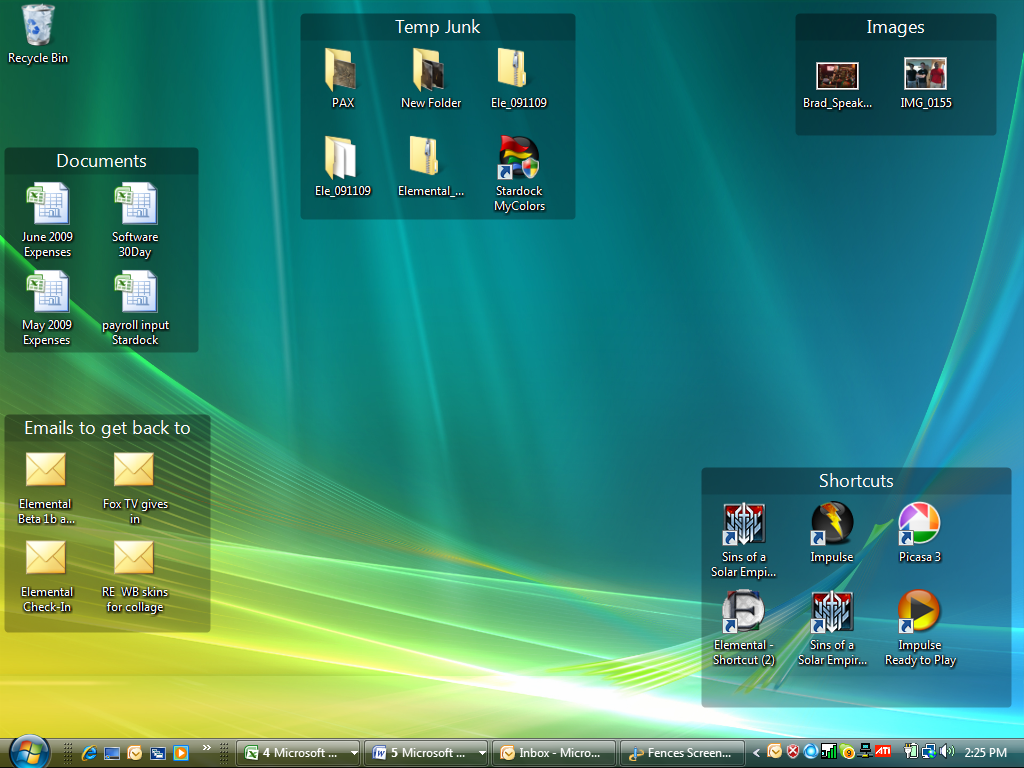
Organize your desktop icons by creating fences and moving your icons into them.
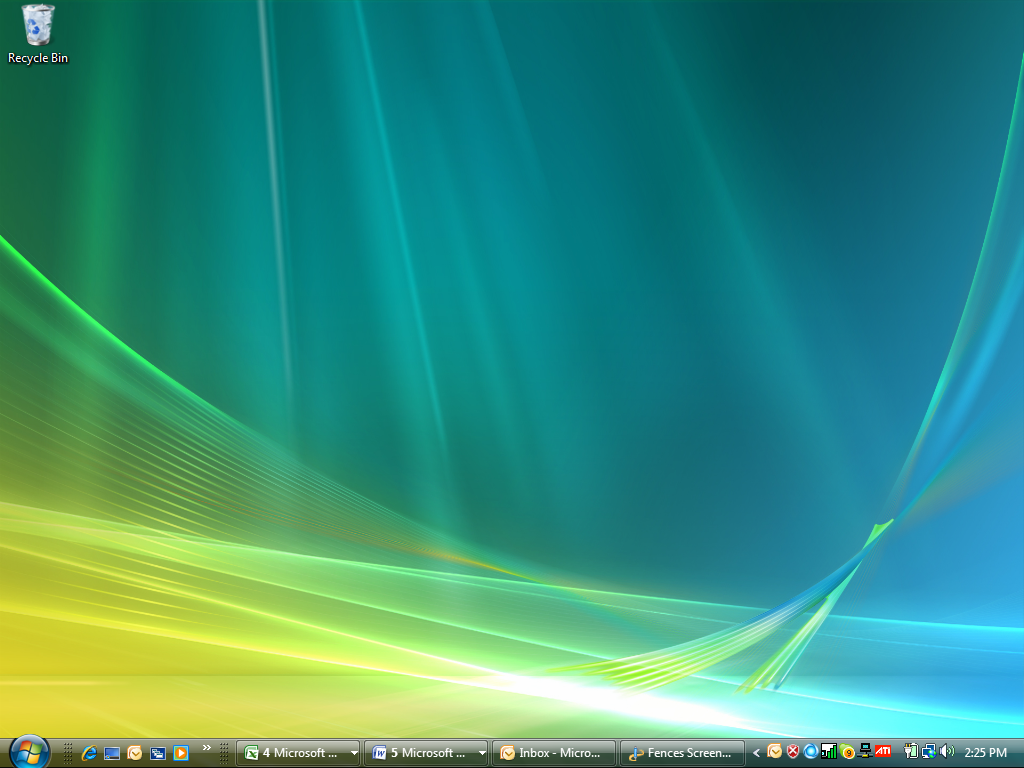
Double Click on the desktop and it will hide your desktop icons, double click again and they come back.
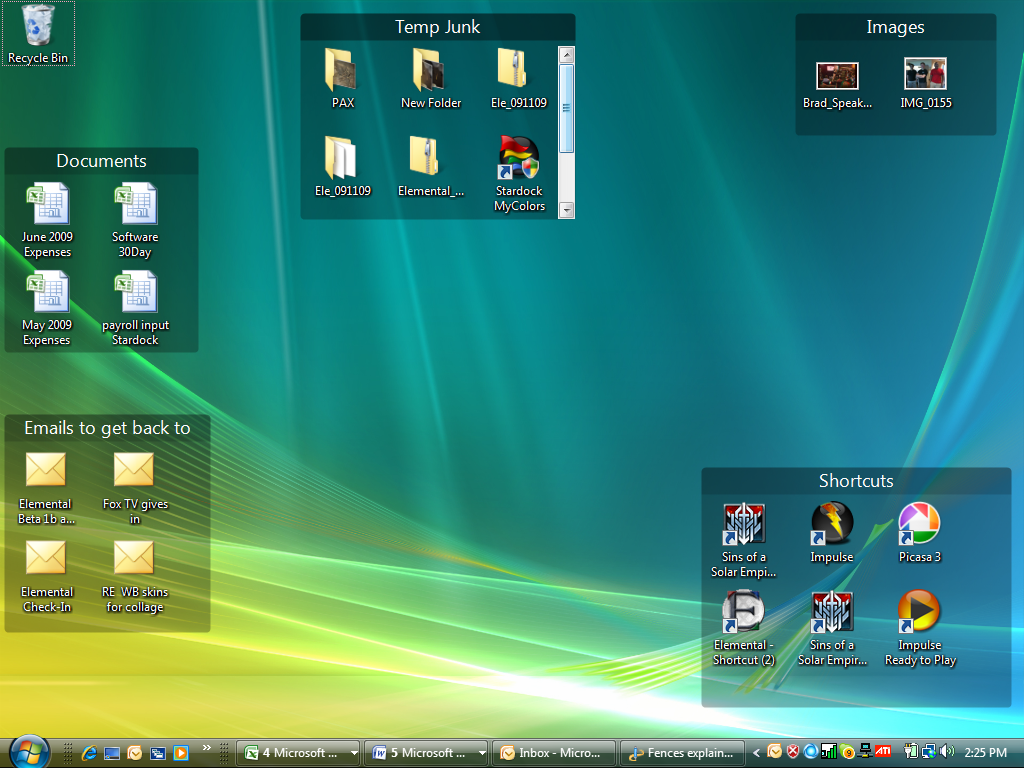
If you put your mouse over a particular fence (like Temp Junk) you can see all the other things in that fence that were hidden.
Enabling Pre-Release (Beta) Versions in Impulse
Wednesday, September 30, 2009 by Island Dog | Discussion: Personal Computing
I have been getting quite a few e-mails lately about how to get the latest WindowBlinds beta, among any other betas we are running at any given time. It’s pretty simple to get the betas downloaded and installed, but if you don’t see them in your list in Impulse, you just have to make a slight configuration adjustment.
Here’s how.

Click the blue button, and that will open up the Impulse preferences. Now just check the box that says “show pre-release versions”. After that you should see any available betas.