























































Zoom Privacy Concerns Cause NYC to Pull from Schools
As the world turns to Zoom to work from home during the pandemic, new security issues have come to light
Wednesday, April 8, 2020 by Tatiora | Discussion: Personal Computing
As thousands of people adjust to working from home amid the coronavirus (COVID-19) pandemic, video chatting has surged to the forefront of necessary tools. This unexpected new development has driven many to try Zoom, an enterprise video conferencing platform with real-time messaging and content sharing.
Unfortunately, Zoom's infrastructure wasn't prepared for the surge of users that have joined since the pandemic started, and the convenience of the platform comes with a security cost. "Zoombombing" is the latest trend for online hackers, who will find their way into an active meeting and disrupt it by displaying pornographic images, writing racial slurs, or any number of other disruptive activities.
Zoom has become a popular choice for many teachers who have had to suddenly convert their learning structure to online learning. With Zoom, they can see and interact with their entire class while they instruct. As the reports of security issues continue to mount and accounts of hackers disrupting meetings become more disturbing, New York City has taken the measure of banning the app from school virtual classrooms. Mayor Bill de Blasio said that the city was "not going to put our students' privacy and our students' data at risk. It's just as simple as that."
The city's Department of Education partnered with the NYC Cyber Command to make the decision and are encouraging schools to defer to Microsoft Teams and Google for remote learning instead. The Department of Education says that they have been training teachers on the use of Teams for several weeks.
Eric Yuan, Zoom's founder, has said that he would freeze all new product development until the privacy issue is corrected. The company enacted a "waiting room" feature and additional password protocols for all basic and free accounts, including those used by classrooms. Only time will tell whether these additional features will be able to put Zoom back in users' good graces.
Edge to Get New Features
Side tabs, tab grouping, cut and paste gouping, password breach alerts are coming.
Thursday, April 2, 2020 by DrJBHL | Discussion: Personal Computing
Edge is going to get some excellent new features:
1) Side tabbing and tab grouping which are designed especially for 16:9 displays.
2) Cut and paste grouping by subject in "Collections".
3) Password breach warnings.
For a more detailed description, look here: http://www.infopackets.com/news/10737/edge-browser-gets-new-features-based-chrome
For a quick peek at how it'll look, go here: https://www.theverge.com/2020/3/30/21199819/microsoft-edge-vertical-tabs-feature-chromium
And...stay safe and well while having a good weekend...here's some amazing free stuff to do, and see: https://chatterpack.net/blogs/blog/list-of-online-resources-for-anyone-who-is-isolated-at-home
Windows 7, 8, 8.1 and 10 Zero Day Vulnerability
The fix/mitigation until there's an official fix
Thursday, March 26, 2020 by DrJBHL | Discussion: Personal Computing
Seems as if all we do is about viruses, anymore, eh?
Well, there's a new zero day vulnerability in Windows and you really should fix it as you could end up infected with ransom ware as a result of its exploitation. MS has found two cases of that, and now that they have described the exploit, chances are much higher of getting hit by it. To get a good description of the problem, check the linked article. If you wish to read the original MS notification, it's here.
"On 23rd March, Microsoft acknowledged a zero-day vulnerability that affects all the Windows computers. The list of affected computers includes the most-updated Windows 10 including the insider builds; Windows 8.1 and 8; Windows 7 which has reached its End of Life, and many versions of Windows Server. However, the vulnerability is a limited targeted attack which means it’s not that widespread and only a certain number of users can be affected — mainly those who deal with font files and the preview pane.
Microsoft has zeroed down the attack to two exploits in the Adobe Type Manager Library which the attackers are taking advantage of. Having said that, the sad part is that Microsoft will be releasing the security patch next month, most probably on April 14, 2020. So until then, you can take a series of actions by yourself which can fix Windows Zero-Day vulnerability on Windows 10 and 7 computers right now."
I'm including a snip of the 'how to fix' article because I added how to deselect the two panels in Windows explorer...it's done with Alt+P, then proceed to the Options, etc.

(from Beebom linked article)
Don't forget to disable the Web client service (at the bottom of the linked article), and then to reboot.
And have a good weekend!
Google Provides Learn from Home Options Amid Covid-19 Pandemic
Wednesday, March 25, 2020 by Tatiora | Discussion: Personal Computing
Over the last few months, the Covid-19 Pandemic has changed the way of life for millions of people around the world. Recently in the United States, schools have been closing across the country, prompting educators to do their best to get resources up online so that all learning doesn’t stagnate.
As children and their parents adjust to this temporary new normal, teachers have been working on setting up remote classrooms and teleconference lessons. To help, Google and YouTube have stepped up to the plate by providing new resources for helping teachers to keep their classrooms running.
Google’s page, called Teach From Home, provides several recommendations for how teachers can teach remotely using Google products. Right now, the page features ideas like doing a video call with a class using Hangouts or creating an online quiz using Google Forms. There’s also a “Teach from Home” toolkit, which has a series of slides with resources on how to teach remotely.
The toolkit suggests that teachers can use google calendars to schedule 1:1 appointments with their students, host video conferences using Hangout Meets (which Google has provided a free premium membership to through July), and make a class website. Google’s accessibility settings also make closed captioning possible and help teachers accommodate those with additional learning needs.
The Learn@Home resources highlight educational YouTube channels that students can watch at home. The page categorizes the channels with recommendations for families with kids 13 and older, families with kids five and older, and for families with preschoolers. YouTube has established a partnership with Khan Academy and other educational creators, featuring channels such as Discovery Education, PBS Kids, Cool School, and Sesame Street. Both Learn@Home and Teach From Home are currently available in English, and will be available in other languages very soon.
Google is also launching a $10 million Distance Learning Fund as part of the company’s $50 million contribution made through Google.org, to COVID-19 response efforts. To begin, Google.org will donate $1 million to Khan Academy’s fund to assist them in providing remote learning opportunities for affected students.
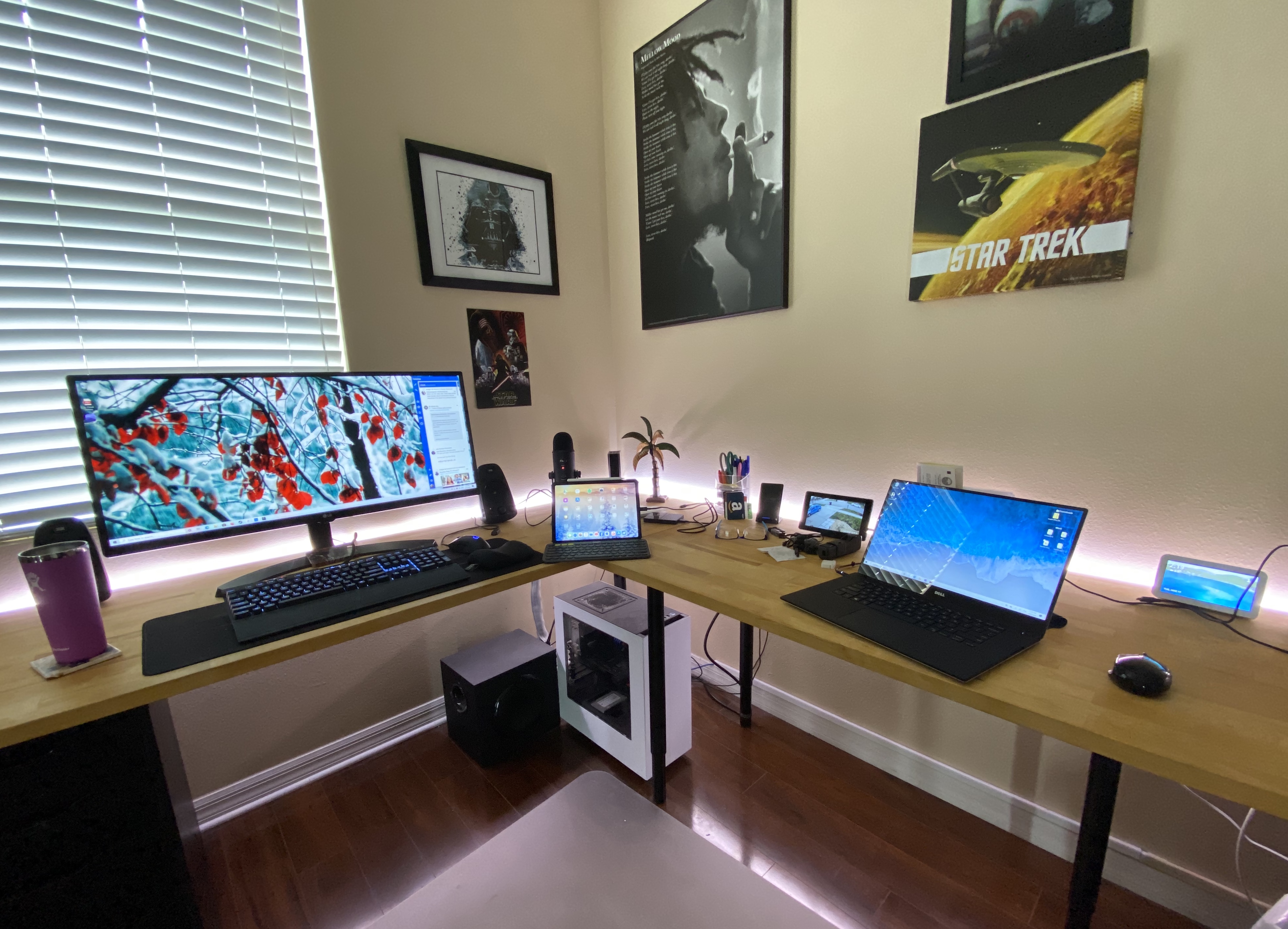
Post your Desktop Workstation Setups!
Tuesday, March 17, 2020 by Island Dog | Discussion: Personal Computing
We always posts screenshots of our desktops, but lets take it a bit further and post images of your desktop setups!
Windows 10 v. 2004 cometh
Actually is feature rich.
Saturday, March 14, 2020 by DrJBHL | Discussion: Personal Computing
This spring, Windows10 v. 2004 or 2020 first half year update (code named 20H1) will be coming and it's feature heavy, with some meaningful changes such as those in Cortana and notepad, Windows subsystem for Linux (WSL 2), Windows explorer with much better local search and tied to OneDrive, sandbox and virtual desktops, and a beefed up Task manager.
There are more, and I suggest reading up on them in the link above.
And have a good weekend! 😉
Which browser affords the most privacy and security?
FWIW, a new study says Brave...but they didn't test Tor.
Wednesday, February 26, 2020 by DrJBHL | Discussion: Personal Computing
Ghacks is an excellent tech website. It was recently sold, however, the tech content has remained in Martin Brinkmann's extremely capable hands.
So, I was perusing there, as I really didn't want to do an article about MS killing the useless Live Tiles in W10, because Start10 beats anything MS has offered with W8 onward, nor about new icons coming to W10 as I think the icons created here beat them hands down, and always have.
So, Brinkmann discusses the findings of this study, which looked at:
"Google Chrome, Mozilla Firefox, Apple Safari, Brave Browser, Microsoft Edge and Yandex Browser...to assess the privacy risks associated with this backend data exchange during general web browsing. Questions we try to answer include: (i) Does this data allow servers to track the IP address of a browser instance over time (rough location can be deduced from an IP address, so IP address tracking is potentially a surrogate for location tracking) and (ii) Does the browser leak details of the web pages visited."
The bottom line result is that out of the box, using default settings (like no autofill), Brave won among them all. In Brinkmann's closing words:
"The researcher analyzed the default state of the browsers and found that Brave had the most privacy friendly settings. At least some of the browsers may be configured to improve privacy by changing the default configuration, e.g. disabling autocomplete functionality."
But, the study left a bit to be desired, at least for me. Vivaldi, Epic browser and (shhh) Tor weren't in this study, and imho, certainly Tor should have been. Interestingly, Bravo has the ability to apply Tor extension to private browsing ("Private Window with Tor: Tor hides your IP address from the sites you visit").
When Tor is put head to head with Bravo, take a look at the results (pros and cons) from users at Slant. It's not the only site which issued a comparison. Truth be told, though, Tor is slower than molasses in January, because of how it's onion layered switching works.
Without starting a browser war or a "mine is better" contest, I'd really like to hear what you all think.
Sources and links:
https://www.ghacks.net/2020/02/25/study-finds-brave-to-be-the-most-private-browser/
https://www.scss.tcd.ie/Doug.Leith/pubs/browser_privacy.pdf
https://www.guidingtech.com/brave-browser-vs-tor-secure-private-comparison/
Hard Drive speeds over the years (2020 edition)
Saturday, February 22, 2020 by Frogboy | Discussion: Personal Computing
We’ve had some great discussions on Hard drive speeds over the years.
One of my favorites was the one about whether SSDs was worth it.
I’ve also been benchmarking my PC’s for a very, very long time:
https://forums.wincustomize.com/168111
Here is a brief recap:

Most of the CPU speed improvements comes from adding more CPU cores. My 2019 machine has 18 cores, 32 logical threads. My 2008 box was the last machine with only a single core in it. That isn’t to say that the CPU experience isn’t much better these days. I’m just saying that unless your app is using all those cores, you could argue that you could divide these scores by the number of cores to get a better approximation of what a single threaded app would perform like.
Anyway, here are the results from my box today:
Samsung 970 Pro NVME:

Sabrent Rocket NVME 2280:

As a practical matter, they’re both incredibly fast.
In real world practice, an NVME (like these) will have roughly the same load times as a SATA SSD despite scoring a lot lower on the benchmarks.
Feel free to use this thread to post your Hard drive specs and scores to share with others.
How to Add “Move to” or “Copy to” to Windows 10’s Context Menu
And a few useful 'how tos'
Saturday, February 15, 2020 by DrJBHL | Discussion: Personal Computing
The external link is a really useful explanation of how to add some power to the W10 context (right click) menu by Brady Gavin at How to Geek.
I won't waste your time with copying exactly how to do a registry edit, but I will reproduce the universal warning about editing the Windows registry:
"The Registry Editor is a powerful tool and, if it’s misused, it can render your system unstable or even inoperable."
A useful link: https://www.howtogeek.com/school/using-windows-admin-tools-like-a-pro/lesson5/
and three more:
1. How to backup your registry: https://www.howtogeek.com/197785/how-to-backup-and-restore-the-windows-registry/
2. How to backup your computer: https://www.howtogeek.com/242428/whats-the-best-way-to-back-up-my-computer/
3. How to create a system restore point: https://www.howtogeek.com/237230/how-to-enable-system-restore-and-repair-system-problems-on-windows-10/
If you're afraid to do this by yourself, Brady Gavin has supplied two registry hack scripts to do all that editing...
"If you’d rather not edit the registry yourself, you can download our Add Move to/Copy to registry hack. Just open the ZIP file, double-click either “AddMoveTo.reg” or “AddCopyTo.reg,” and then click “Yes” to add the information to your registry." - Brady Gavin
However, do your backups and create a restore point before using the scripts (REG files).
And, have a great weekend! 
Ultimate Windows Tweaker 4.7 Released
More than 200 tweaks in more than 10 sections
Sunday, February 2, 2020 by DrJBHL | Discussion: Personal Computing
Razvan Serea wrote a good review of Windows Ultimate Tweaker 4.7
over at Neowin, including the change log. There are more than two hundred new tweaks, and most pertinently new ones in the privacy and security sections...nice for the folks who are new to W10 from W7 and who are (rightfully) concerned about the former.
The full list of the tweaks are here: https://www.thewindowsclub.com/list-of-tweaks-available-in-uwt4 .
Here's a screenie showing privacy tweaks. The red arrow simulates my cursor. Note the explanation the app shows for "Disable telemetry".

As with any app, and especially one like this one, I'd advise creating a restore point before tweaking away. It's very convenient the app reminds you to do so, as well.
It's a great app...one many of us had and probably forgotten all about, and well worth downloading, here: https://www.thewindowsclub.com/your-download-of-uwt4-will-start-in-5-seconds and as the link mentions, download commences 5 seconds after landing there.
It is freeware, without ads or other software with it.