























































Object Desktop 2017
Thursday, October 27, 2016 by Draginol | Discussion: Personal Computing

My desktop running WindowBlinds, DeskScapes, WindowFX, Fences, Start10 at 5K resolution

IconPackager, Tiles and more at 5K resolution
Object Desktop is a suite of desktop enhancement utilities designed to allow users to customize their Windows desktop to work however they want it to work.
The core components of it are:
- WindowBlinds – customize the Windows GUI
- Fences – organize your desktop
- IconPackager – customize your icons
- DeskScapes – customize your desktop background
- WindowFX – customize the UI behaviors
But that line up has changed as Windows has changed over the years as Windows has changed.
When Object Desktop first launched for Windows its 5 core parts were:
- WindowBlinds
- ControlCenter – virtual desktops
- IconPackager
- Tab LaunchPad – launching programs

Back then, the idea of “skinning” your Windows GUI was radical.
By 2000, we had added a 5th item: DesktopX

DesktopX let us objectify the Windows desktop. It was one of our most popular components. Unfortunately, the Windows UAC (the security features built into Windows) eventually made DesktopX untenable because, by its very nature, it was designed to integrate executable code into the desktop which is the opposite of what Microsoft wanted to accomplish with its secure desktop initiative.
Windows XP Era
By 2004, Object Desktop had 3 years of Windows XP to be able standardize all its efforts on. This resulted being able to create Theme Manager which let users gain total control of the Windows desktop.


Object Desktop 2004
Windows Vista
Windows Vista was tough on Stardock and Object Desktop. Microsoft pioneered a number of amazing technologies including Windows Presentation Foundation (WPF), XAML, Silverlight and more. For two years, Stardock put a great deal of effort into creating an Object Desktop Vista. This included a DesktopX that could import XAML and export sidebar objects, a version of WindowBlinds that would use WPF to create resolution independent windows and a desktop compositor and of course the animated wallpaper program, DeskScapes.
Unfortunately, two things happened. First, Windows Vista did not replace Windows XP for most people. Second, Microsoft decided to change direction leaving its promising new technologies sidelined.
Moreover, the new secure desktop, UAC, made it very hard to run DesktopX.

Object Desktop 2006
Windows 7
With Windows 7, Microsoft was back on course. Stardock updated Object Desktop to version 2010. DesktopX was deprecated and in its place was Tweak 7 which gave users the ability to modify various largely hidden settings.

Tweak 7
Windows 8…sigh
For Object Desktop to thrive, it needs a single OS target. This is very important. Windows 8 split the Windows market. It made Start8 possible (which became very popular) but it meant that any technology we developed would have to be aware that it might not work on most of our customers machines.

Start8
Object Desktop 2013 saw Start8 and Fences become the two stars of Object Desktop. Neither program, however, was about customizing the look and feel of Windows as much as altering the way people work with Windows.
Windows 10
With Windows 10, Microsoft has created an OS that appears to be their new flagship. It’s still new but it appears that it will be a stable platform for us to focus our Object Desktop development efforts. This means we can potentially revisit bringing back apps that were broken on certain versions of Windows and get them on Windows 10.
The real question is, in the age of mobile computing, what is the use case of a Windows desktop (or laptop) PC?
Object Desktop 2017
Since the release of Object Desktop 2016, Stardock has added two new programs to Object Desktop:
- Multiplicity
- SpaceMonger
Neither customizes the desktop but rather focuses on what we are calling the Metadesktop. Multiplicity lets you easily access your other desktops on other machines and SpaceMonger lets you manage your drive space on your desktop and cloud drives.
This represents the start of the next stage of Object Desktop.
Let’s take a look at the core components now:
WindowBlinds
The hardest part of WindowBlinds development now is high DPI. Many of the skins were designed when everyone was running much lower resolution. WindowBlinds 10 nails high-DPI support but not all skins will play well with it. This will be an ongoing evolution for WindowBlinds 10.

WindowBlinds 10
DeskScapes
Animated wallpapers are pretty cool. And today, they use trivial amounts of resources. When DeskScapes first came out, CPU use was a concern for animated desktops. Now, machines are so much faster it’s barely measurable.

DeskScapes 10: Animated wallpaper
Fences 3
Stardock released a new generation of Fences this year.

Fences 3
But we have a lot of plans in mind for future versions of Fences. For example, in the age of cloud storage, imagine being able to create fences to Google Drive folders? Or a Fence of your YouTube subscriptions? The mission of Fences, now that Windows 10 seems to be the standard will evolve to incorporate your world into your desktop experience. We’re very excited.
Tiles
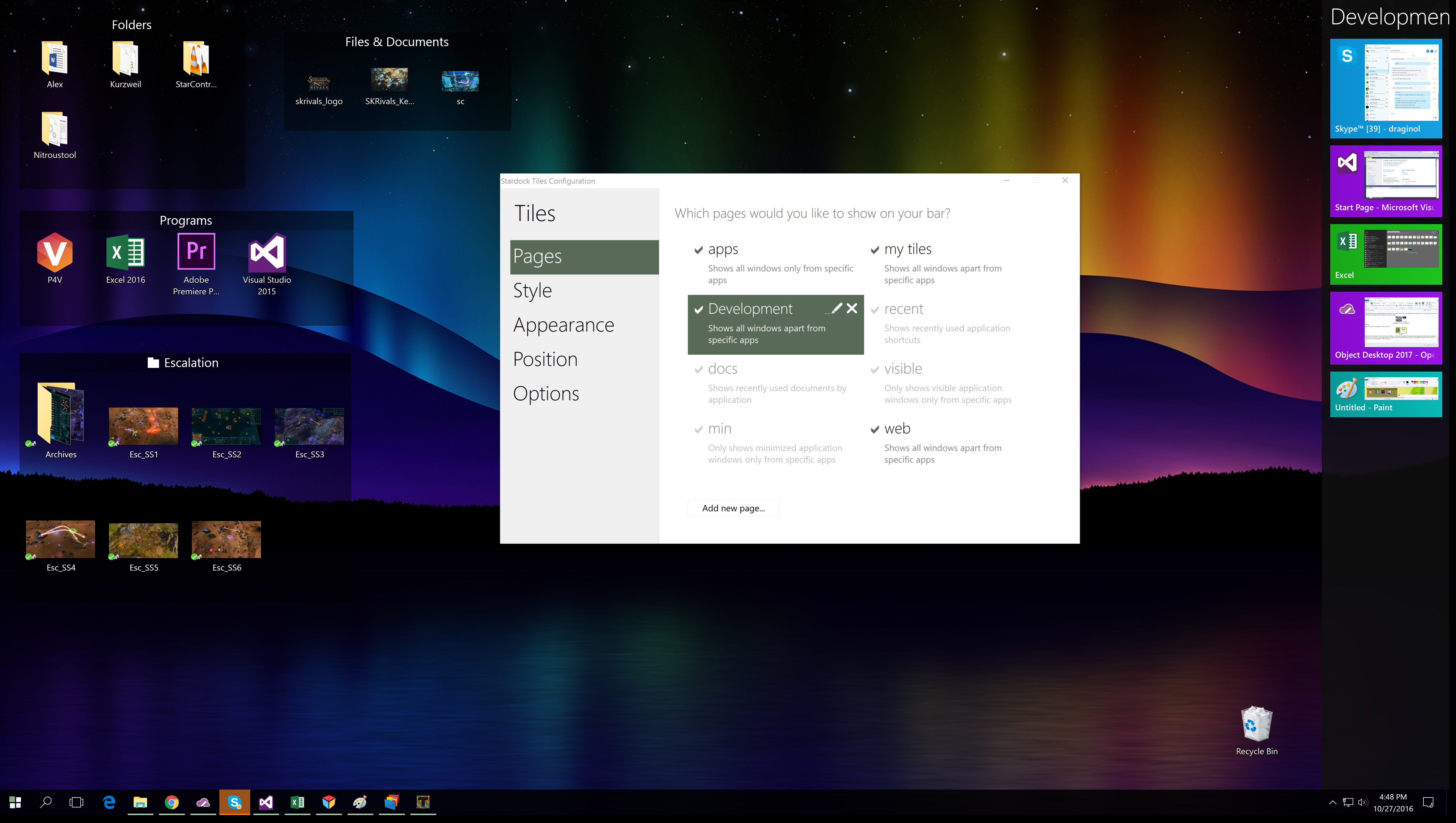
Tiles is a program that doesn’t get enough attention. The idea behind Tiles is that you have a sidebar with a series of pages on it. Each page can have different things on it depending on what you’re doing.
Tiles
On my desktop I have these pages:
- Development page. I keep Visual Studio and a few other apps related to making software here.
- Business page. This is where I switch over to start working on budgets and contracts
- Games page. This is where I link to the various games
- Surf page. This is just a list of my favortie sites I visit. It’s how I quickly get to all the forums and such. Just click click click.
We are looking to further update Tiles (or possibly rebrand it as its mission has changed since its original release) to address Object Desktop 2017’s mission of integrating your world onto your desktop.
Start10
Is the Windows 10 Start menu better than the Windows 8 thingy? Yes. Is it good? That’s only something you can decide for yourself.
As someone who deals with a lot of programs, Start10 is probably the first thing I install on a new box with Fences being a close second.


Start10

Windows 10 on my relatively new box. Thank goodness I know the weather.
Start10’s mission, to keep with our theme, will evolve as Windows 10 stays around longer. Think about how you use your modern desktop. You may have an Android device or an iOS device. Does your Start menu pick up any of this? Most people now have multiple devices. Their desktop is supposed to be a superset device. That’s where we have to go with Start10 in the future. Keep the Start menu a simple, fast way to access your things but also give you the ability to quickly access anything on any device. Google and Apple are already doing this on their devices. Windows needs to do the same thing.
Multiplicity
Multiplicity is best known as the program that lets you control multiple PCs with a single keyboard and mouse. The idea is that you might have a desktop and a laptop or maybe a couple other desktop machines that you have local access to and want to be able to combine these machines into a single user experience.

Multiplicity is super easy to set up.
More recently, Multiplicity added support for machines that aren’t local. In this case, it acts more like a KVM switch or a remote desktop solution. What makes Multplicity differnet from a normal remote desktop solution is that it is focused on fidelity from top to bottom. For example, you could play a video game via Multiplicity without a problem.
Once again, with Windows 10 becoming our target OS going forward, Multiplicity has a lot of room to grow over the next year. Our goal, again, is to integrate your digital world to your desktop.
The others
This past year we released IconPackager 10, the first major update to IconPackager in some time. Once again, the reason is that Windows 10 is becoming a viable target for development – i.e. our finite development time isn’t going to be put into targeting something that is going to be thrown out in 2 years.
WindowFX continues to evolve as well. We haven’t decided whether we will evolve the touch and other features we have in mind into WindowsFX or into a new Object Desktop program.
SpaceMonger is another recent entry into Object Desktop. With its ability to manage not just your local storage but your cloud, it’s compelling.

SpaceMonger will map out Google Drive, OneDrive and Dropbox use
We want to hear from you!
So how can you get Object Desktop 2017?
Just go to www.objectdesktop.com and there are options to renew your access to it (if you previously had Object Desktop) or get it new. When you buy it, you access the Object Desktop manager which handles installing the components.
Comment below with your own thoughts on what you’d like to see.
3 Tips for Using Stardock's Start10
Tuesday, September 27, 2016 by Island Dog | Discussion: Personal Computing
Ever since Windows 8 came out with the missing Start menu, Start8 has been a very popular Stardock app because it brought users back to Start menu they were familiar with. Even when the Start menu eventually returned, Start8 remained popular since it still offered Windows users a variety of options and customization.
Fast forward to today and now we have Windows 10 with its own take on the Windows Start menu. That’s where Start10 comes in, and just like before, gives Windows users the features and customization options to make the Windows Start menu look and function like they want it to.
Below, check out a few tips to make your Start10 experience even better!
Start10 Integrates with Fences
Fences is another hugely popular Stardock app, so it makes perfect sense that some integration has been added. Fences lets you organize your desktop icons into grids called "fences", and now those fences are integrated right into the start menu with Start10. Any fence you have on your desktop will now also appear as entries in the Start menu.

Use a Custom Start Button
Start10 has several options for unique Start buttons that you can choose from included in the configuration screen. If you want to use a different image, there are hundreds available for download from WinCustomize.com that can be easily implemented. Pick the image you want to use, and that will be your new button on the Start menu.

Apply Textured Backgrounds to Start Menu and Taskbar
Start10 allows you to customize the Start menu and even the taskbar with the ability to apply textures. You can select from a variety of textures and can even adjust transparency, color, and other customizations to get your Start menu and taskbar looking exactly how you want it to.

Learn more about Start10 here.
Windows 10 tip of the day: Why does my battery drain while sleeping?
Tuesday, September 8, 2015 by Frogboy | Discussion: Personal Computing
Does your laptop or tablet run out of battery while it’s supposed to be asleep?
You can find out why thanks to a fairly obscure but relatively new feature in Windows.
Step 1: Open a command prompt in adminstrative mode
Step 2: Go to a temp directory (like cd\temp)
Step 3: Type powercfig /SleepStudy
This will create a file in the current directory. Open that file in your web browser and you will find out why.
Common causes:
- Notifications. Even while sleeping, the Windows notification system (WNS) does stuff. Turn off as many unnecessary notifications as possible.
- Your type cover can wake the machine inadvertently.
- Your network card. Make sure you have the latest firmware and network drivers.
Good luck!
Gift Purchasing from the Stardock Store
Friday, April 10, 2015 by Island Dog | Discussion: Personal Computing
With a new store page, I wanted to refresh the guide for purchasing gifts through the Stardock Store. Whether you want to purchase a game or desktop application, you can easily purchase it and send it digitally to a friend or family member to enjoy. It’s easy to do, and here’s how!
You might end up at the Stardock store from our various sites, but you can access the store directly from https://store.stardock.com/.

Once you place the order the recipient will receive an e-mail with their registrations and download info. Your personal or payment information will not be seen by the person receiving the gift.
Registration and downloads can always be found in your Stardock account at http://download.stardock.com
Start8 and Fences: First Apps Installed on New PC
Tuesday, February 17, 2015 by Island Dog | Discussion: Personal Computing
If you follow my posts you might have seen I planned and recently finished my new PC. Putting together a new PC is a bit of work, at least assembling all the parts together and making sure everything works. That's only one part of it though, as you also have to install Windows, install all your apps and games, and then get your data moved back.
My new PC doesn't have an optical drive, so I loaded up my Windows 8 ISO onto a USB drive and installed it. It didn't take long at all to install, and there was my new desktop. Once I got updates installed and all the necessary drivers installed it was now time to get all the software I needed installed.
Before I got too far into my new desktop, I found myself continually trying to open the start menu. After a few minutes of that, it was time to install Start8 and get my start menu back. I installed it and set it up to how I like it, which is to have the Windows keys on the keyboard open the Windows 8 Start screen, and the start button to open the start menu. Now it was much easier to navigate and quickly open places on my computer.
Next was to install Fences. I was downloading a bunch of apps to install and my desktop was quickly filling up with icons, so that is where Fences comes in. I created a folder portal with Fences to show my downloads folder, so everything I downloaded was placed there and was kept contained in that Fence. Instant order came to the desktop.
Once those were installed I started installing the most used and important apps. This is also a good time not to install everything you had before, and just focus on the software you really need and use. While I still have a few more things to install and get setup, these are my tops apps I got installed.
- Steam
- Office
- iTunes
- Chrome
- Firefox
- LastPass
- Dropbox
- Live Writer
- MetroTwit
- Snagit
Those are just a few of what I find most useful, but I still have several more to get installed. Here's my current desktop which I still need to do some more organizing with.

Get Start8: https://www.stardock.com/products/start8/
Get Fences: https://www.stardock.com/products/fences/
The end of year musings: 2014 edition
Wednesday, December 31, 2014 by Frogboy | Discussion: Personal Computing
Naturally I’m waiting until the last day of the year to finally write this.
If you’re looking for a drab, properly edited, PR approved article, this is not that article. So hang on as we do a skim through of the hyperbole of awesomeness that’s been going on this year.
Let me get this part out of the way: If you’re a gaming journalist, we’re going to be at GDC with a suite. In that suite will be Soren Johnson (Civ IV), Bruce Shelley (Civ, Age of Empires), Dan Baker (co-author of the DirectX shader language, engine lead on countless games), Dave Pottinger (Age of Empire series), Dorian Newcomb (art director on countless games), Tim Kipp (system lead on countless games including Civ V and industry expert on touch UI integration). And we’re going to be showing a lot of never before seen things and reacting to some of the upcoming industry announcements that aren’t currently public. If you’re in the media and want to cover any of this, contact our PR manager, Stephanie Schopp ([email protected]).
Now, let’s talk about this past year:
Here’s a brief recap for those of you in the Stardock community:
The new game studios
Back in 2011 when Stardock sold Impulse to Gamestop we were asked what we were going to do with all that capital. At the time, I said we would set up an investment fund to help fund startups. 2014 was the year when we unveiled the first of these new companies. It’s been a real challenge keeping the things we’re working on under wraps.
Oxide Games
 www.oxidegames.com was announced early this past year and unveiled a tech demo called Star Swarm. Someday we’d like to do a full on game of it but the purpose here was to show Mantle (and while we couldn’t say anything at the time, how a future DirectX 12) could dramatically change the way games are made. Right now, as we speak, any games you’re playing are communicating with the GPU via 1 core. You have 4 cores? 8 cores? That’s nice. They’re doing little for you in terms of improving your gaming experience. But Mantle and DirectX 12 will change that. This will be a very big deal in the coming years.
Oxide is making a new type of 3D engine that will take advantage of this which will allow us to make new types of strategy and role playing games into the future.
The Oxide team is led by what was essentially the Civilization V engineering leads which includes one of the developers of the DirectX shader language.
Mohawk Games
 Meanwhile, acclaimed designer, Soren Johnson and I founded Mohawk Games together. Soren is best known as the lead designer of Civilization IV. He has assembled an amazing team from around the industry and they’re currently working on a game called Offworld Trading Company. And the good news is that this game is expected to go into Steam early access around this February.
OTC has been a mixed blessing. I kid you not that this game is banned from being played outside of lunch hours now. Even though it won’t ship until 2016, it’s been being played multiplayer for a long time. Don’t worry single player fans, Soren has you covered. Even now, it’s single player AI is remarkably good (did I mention it’s still a year away from release). Once released, its addictiveness will no doubt result in arrests and investigations. I’ll be in Belize by then.
Stardock: Towson
We also opened an office in Towson Maryland. We’ve been lucky enough to recruit some amazing talent including Civilization V art leads (terrain, models, etc.), sound and music leads and some Big Huge Games veterans. We are very fortunately to be located down the street from Firaxis, the world’s #1 strategy game studio (imo) and we share the building we’re in with Brian Reynold’s Big Huge Games (though they managed to get the lead graphics dev we wanted for Star Control!  )
)
The studio out there is working on Star Control. Right now, it’s just the underlying game systems (which uses Oxide’s Nitrous engine). The main game is expected to begin development this year once we’ve recruited a lead designer for the game. Unfortunately, Paul Reiche, one of the best game designers in our industry’s history and the creator of Star Control 1/2, is pretty busy on Skylanders these days.
We’ll be talking a lot more about the new Star Control in 2016. Not too much will happen this year other than saying that while we will continue to support and promote the original Star Control classic series (www.starcontrol.com) the new one will be a reboot and have a different set of lore from the classic series.
Mothership Entertainment
Meanwhile, down in Texas, industry veteran Paul Tozour and us have founded Mothership Entertainment. They’re working on a game that we expect to announce this year but won’t be released until 2016. I can’t even hint at it right now. 
Stardock: Austin
All the new games, including Galactic Civilizations III and Sorcerer King will be using a new meta game service we internally call Tachyon. The simplest way to describe it is that it’s Battle.net built on top of Steamworks. So in case there’s any question on this: As far as Stardock is concerned, Steam is the PC game platform and Steamworks is its API. I could write entire articles on how impressed we’ve been with Valve. They run Steam in a way that only a privately held company could run it. But I digress.
We want our new games to be able to have a meta experience like you see with Battle.net (which we love). Luckily, we were able to recruit one of the original Battle.net architects, Adrian Luff from Blizzard to run the new studio.
Other cool stuff coming up
BonusXP
 Ensemble Studios created some of the best games of all time including Age of Empires and Age of Mythology. When Microsoft closed Ensemble, many of its key leads went on to form a new company called BonusXP.
In 2015, their first major PC game will be announced. The new game, whose developers include Dave Pottinger and Bruce Shelley is expected to be unveiled before GDC in 2015. One of the reasons we feel very certain this game will become very popular is that after playing it, its game mechanics seem so obvious in hindsight. In fact, I expect we’ll see a lot of games…borrow from it in the future. I’m a fan.
Windows 10
We have a lot of things coming up for our non-game software (Object Desktop). Still, if all goes well we will be in the position that in 2015, more than 50% of our revenue will come from games. Most of our customers know us from our non-games.
 Unfortunately, since our programs tend to end up part of the OS, we tend to not talk about what we’re coming out with until the new version of Windows is far enough along that something won’t get integrated. Which isn’t to say we mind if Microsoft incorporates our OS ideas into Windows. Anything that makes Windows better is good for us all. But we have some new things in development that are so obvious that once you see them in action you’ll know they’ll be part of the OS at some point.
Galactic Civilizations III & Sorcerer King
I can’t forget GalCiv III. The beginning of 2015 will start out with us releasing the types of games we’ve been traditionally known for: 4X strategy games. Both of these games excite me for very different reasons.
GalCiv III is being built on a brand new, 64-bit platform. It’s a custom engine designed to be built on for the next decade. This matters because it will allow us to create, what we hope, is a true living breathing galaxy with amazing depth over time.
 Sorcerer King, is exciting because the game lends itself to third-part modder expansions in a way nothing we’ve made before does. It was remarked by one of our modders that you could remake Baldur’s Gate with the Sorcerer King engine.
The people on the other end of your screen
I just wanted to end this with a mention of how much we appreciate you. There are very few independent tech companies from our generation left. And I can tell you, it’s a pleasure being able to talk to our customers and our friends in the media as openly and plainly as possible.
I believe this transparency has been crucial to our success over the years. We are techies. We make no bones about that. We love what we make and I say this without reservation, we love making this stuff for you.
Object Desktop Infinite: A Great Deal for Windows Enhancements
Wednesday, November 12, 2014 by Island Dog | Discussion: Personal Computing

Stardock unveiled Object Desktop Infinite not too long ago, and it introduced a great way to get a bunch of desktop enhancement apps for a very low monthly subscription price. There’s been some questions about the differences between Object Desktop and Object Desktop Infinite, so I wanted to answer a few of those questions and give a general overview of what you’re getting with Object Desktop Infinite.
What is Object Desktop and Object Desktop Infinite?
They are the same thing except for one thing, which is the subscription model. They both give you access to a whole suite of desktop enhancements that can customize the appearance and functionality of Windows. You get popular applications such as WindowBlinds, Start8, DeskScapes, Fences, ModernMix, and more. As long as you have an active subscription, you get all updates and any new apps added to Object Desktop.
With Object Desktop Infinite you get all this for $9.99 for the first month, and $3.99 each month which is automatically billed. Object Desktop is a year subscription for $49.99.
Learn more about Object Desktop Infinite | Get Object Desktop Infinite
What exactly do we get in Object Desktop?
You get some great desktop apps! I guess you want more details than that, so here’s what you get with your Object Desktop subscription.
- WindowBlinds – Change the look and feel of your Windows desktop by applying different skins.
- Fences – This lets you organize your desktop icons into customizable fences on your desktop.
- Start8 – Brings back the missing Windows 8 start menu.
- DeskScapes – Apply animated and static wallpapers to your desktop.
- ModernMix – Have multiple Modern apps in resizable windows on your desktop.
- Launch8 – Adds a stationary dock to your Windows 8 Start screen.
- ShadowFX – Add drop shadows to Windows 8.
- Tiles – Create multiple desktops of related programs, files and links enabling quick swapping between projects.
- Decor8 – Personalize your Windows 8 Start screen with your own pictures and color schemes.
- WindowFX – Customize windows and menus with animations and special effects.
- IconPackager – Change your icons all at once with custom icon packs.
- Theme Manager – Customize the look and feel of your entire Windows environment from an easy to use interface.
Apps can be downloaded and managed with the Object Desktop Manager application, or you can download the installers from your Stardock account.

Do these apps work with Windows 8? What about the upcoming Windows 10?
Many of the apps are compatible with Windows 8, Windows 7, and some are Windows 8 only such as Start8. You can check the system requirements here to see more specifics. As far as Windows 10, it’s still in preview at the time of this posting. We don’t officially support an OS until it’s actually released, but we might release updates in beta. As mentioned before, as long as your subscription remains active you’ll get updates and new apps.
Where can I get more skins and themes to use with Object Desktop?
Some of the apps included in Object Desktop make use of custom skins that can be downloaded and applied. Apps like WindowBlinds, DeskScapes, and Start8 are good examples of apps that can be customized. WinCustomize.com is where you can browse and download thousands of skins for any Stardock application that can be used.
Any resources to help get started with Object Desktop apps?
All the apps included in Object Desktop are easy to use, and we’ve tried to make them as user-friendly as possible. We do have a list of tutorials and guides that have been created to show users how to use the apps, and to help you understand what you can do with these apps to make Windows function and look how you want it to. You can see the list of articles here.
What if I need more help with Object Desktop?
If you need any help using Object Desktop you can visit our Support page. We have a knowledgebase available that can assist you, or you can contact our support team. We also have a helpful community forum where other Object Desktop users help others with questions also.
This sounds great! Where do I sign up?
Right here!
Learn more about Object Desktop Infinite | Get Object Desktop Infinite
Review: Snagit 12 Screen Capture Software
Wednesday, September 3, 2014 by Island Dog | Discussion: Personal Computing
I’ve been talking about and recommending Snagit for many years here on WinCustomize. I started using it many versions ago as I needed a tool to capture screenshots with features that just couldn’t be found in Windows or other similar apps. A few months ago TechSmith released Snagit 12 with several new features including a new user interface for the editor, an enhanced capturing experience, and more. For the last month or so I’ve been using the latest version and wanted to share my thoughts about it, and a big thanks to Betsy Weber from TechSmith!
Snagit is obviously well known for capturing screenshots, but you should also know that it also captures video as well. Their new enhanced capture now lets you select the area to be captured first, then you can select whether you want to snap a screenshot or record a video clip. Another useful feature to note is scrolling capture. Need to capture an entire webpage of content for example? This lets you do that quickly and easily. Profiles can also be used to streamline your capturing process. These customizable profiles let you configure a capture and choose how to take the image and what to do with it when taken. For instance, you can set it up to export to a specific location like Dropbox, or be inserted directly into an application like Word.

Once your image or video is captured it’s opened in the newly designed editor. Here you have plenty of editing options for images, and for videos you can do basic editing. Taking a screenshot is one thing, but what you can easily do with it afterwards is key in many cases. When writing articles about the various Stardock applications we have, it’s often useful to point out or emphasize specific parts of the UI to show users a feature or function. Snagit excels here because it has a variety of tools that are designed to accomplish this task. Whether it’s a simple arrow, a speech bubble, or one of the many stamp graphics available, you can be sure you have the right tool to show and direct viewers to exactly what you want them to focus on in an image.
The editor is actually very useful for all types of image editing. It use it frequently just for basic editing like resizing and cropping even with images I didn’t originally capture with Snagit. You can expand Snagit even more by downloading more stamps to use in your images, and there’s a wide variety available for download.

The number of images you capture can quickly add up, but Snagit has an integrated library where you can find, sort, and view past captures. The Snagit library sorts captures by date or by the application they were captured from. This is especially useful for me because I can quickly find the images that were taken from a certain app such as WindowBlinds or ObjectDock. Images can also be tagged or assigned flags for even more organization.

Getting your image captured and edited is one thing, but doing something with that image is another. That’s why sharing is a very big part of Snagit and they’ve continually updated this with more sharing options. Images can be saved in the familiar way of saving into a variety of supported image formats, or you can export images into various applications using the integrated output accessories. With just a click you can export right into Word, OneNote, Camtasia Studio and other supported applications. Snagit also lets you share to Facebook, YouTube (video captures), Dropbox, Google Drive and to Screencast.com. Other outputs for other services and apps can be downloaded to expand sharing even further.

There’s still lots of features I wasn’t able to cover, so be sure to visit the Snagit site to get an overview of everything that Snagit can do. It’s one of my most used apps on both my Windows PC and Mac, and I highly recommend it.
They offer a free trial, and there’s upgrade options also available for previous users.
Link: Snagit
Use Launch8 for a Quick Launch Dock to Windows 8 Start Screen
Tuesday, August 19, 2014 by Island Dog | Discussion: Personal Computing
Since the launch of Windows 8, Stardock has released several award winning apps, like Start8 and ModernMix to bring back lost functionality and add new features for users of Windows 8. Another Windows 8 app from Stardock is Launch8.
Launch8 adds the convenience of a quick access stationary dock on your Start screen. Drag and drop your favorite applications to your Launch8 dock and quickly launch them no matter where you have swiped to on your Start screen.
Learn more about Launch8 | Get Launch8 for just $4.99

Once Launch8 is installed you will have a dock on your Windows 8 Start screen. You can choose to place the dock at the top or bottom of the screen, and customize it to have a translucent background.
Apps are added by simply dragging and dropping them to the Launch8 dock. You can create shortcuts for Windows 8 Modern apps or regular desktop apps that you use everyday. Icons can be arranged by dragging them around, and the size can be controlled in the Launch8 configuration.
The Windows 8 Start screen can become quite large if you have a lot of apps displayed. The Start Screen scrolls from left to right to display all of your apps. Launch8 stays stationary so you will always have quick access to your shortcuts, regardless of where you have scrolled to on the Start screen.

Launch8 can also be enabled to show jumplists for apps that utilize them. In the screenshot above I am viewing the jumplist for Steam showing items like my recently launched games. This is especially handy with many apps, including Office where you can open recent documents right from your dock.
If you need a way to have quick access to frequently used applications on your Windows 8 Modern Start screen, Launch8 is the perfect solution.
3 Stardock Apps for a Productive Office Desktop
Friday, July 18, 2014 by Island Dog | Discussion: Personal Computing
Whether you work in a traditional office environment or have your own home office setup, having your Windows desktop working at maximum efficiency is a key step in being as productive as possible. Stardock makes a bunch of great desktop customization and enhancement apps, and while they all offer a benefit to the desktop, I wanted to write about the ones I think are a huge benefit to your productivity as well.
I have used these applications in my home office for years, and I can say without a doubt they help keep my desktop organized and keep my workflow going.
Fences®
Fences is really one of those must-have tools for your desktop. It’s been very popular since it was first introduced and millions of users use it to keep their desktop icons clean and organized. Fences gives you the ability to create shaded areas on your desktop that hold your icons so you can keep them organized and your desktop clutter-free. Multiple fences can be created and their size and shape can be adjust to fit on your desktop just how you like them.

ObjectDock™
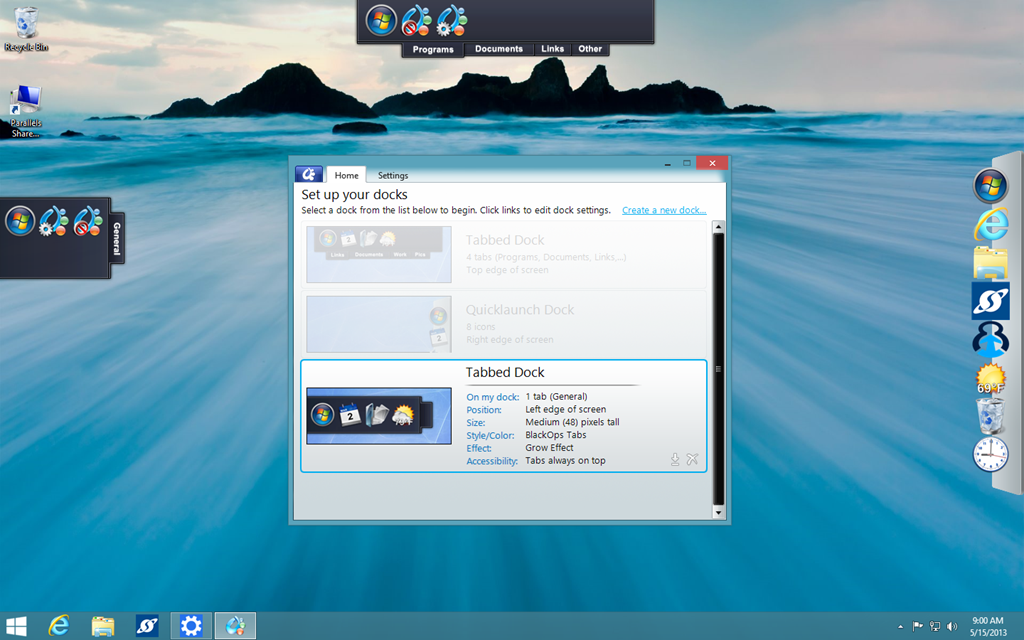
ObjectDock puts an animated dock on your desktop where you can launch applications, file shortcuts, folders, and more. The dock can be customized with custom backgrounds and icons, the size and position can be changed, and effects can also be applied. In addition, ObjectDock also supports docklets which are mini-apps that can display information like the weather, calendar, clocks, and more. ObjectDock also has tabbed docks which makes it easy to organize apps and shortcuts by using sorting them into different tabs. It’s a fantastic way to have quick access to frequently used items.
Tiles™
If you have lots of running applications on your Windows desktop then Tiles is an app that can help you greatly. Tiles puts a customizable sidebar on your desktop which contains multiple pages that let you manage your running tasks and application windows. You can switch between pages by swiping your mouse or using the keyboard, and Tiles even supports multi-touch displays.
