























































Stardock Software Wiki is Available!
Monday, February 8, 2021 by Island Dog | Discussion: WinCustomize News
 We used to have a software wiki many years ago with entries for all of Stardock software and WinCustomize. Unfortunately, all its data was lost quite a long time ago and it was a nice resource that was missed. The good news is we've been building a new wiki just for software and it's ready to go!
As it is a wiki there is still some work to do with updates and such, but overall, this is a great resource for information on specific software. If you need to easily find changelogs, tutorials, blogs, videos, etc. then each software wiki will have those available. I've updated many of the software tutorials and articles to keep them updated with the latest changes, but there's still lots more to do.
Check out our new software wikis here!
Stardock Software - Official Wiki

Let's take a look at Tiles 2.0!
Object Desktop Members can get into the beta right now
Thursday, February 4, 2021 by Tatiora | Discussion: Stardock Blog
It's already been an exciting year for Stardock software - and it's only February! We are working on DeskScapes 11 still (you can see some previews and walkthroughs), but today I’d like to focus on our newly released beta for Tiles - what’s already there, and also what new things are coming to the app with the latest version.

If you’re unfamiliar with the software, Tiles is a program that lets you create multiple desktops of related programs, files, and links through the use of a customizable sidebar on your Windows desktop. You can drag programs onto the sidebar by holding the shift key; it will then create a thumbnail of that application so that you can find it easily.
You can have multiple pages of Tiles and categorize and label them anyway you wish, allowing you to organize your tasks in an efficient and visually appealing way. You can click through your lists of tiles and swipe left/right easily to access your other groups. Additionally, you can adjust the size and position of where your Tiles bar sits.

Speaking of organization, I think my favorite Tiles feature is new to v2.0. In settings, I can change it so that certain Tiles categories show only maximized or minimized Windows. This is especially great for a 2-monitor setup, since I can keep the tiles on one monitor and easily click through to apps and tasks that I can utilize on my main monitor.
In my case, I made it so that my Tiles pages wouldn’t show any of my minimized apps, so whenever I had something open it would leave the list, making it easier for me to find my other tasks. You can also filter what types of apps go into which Tiles groups.

Of course, we would be terribly remiss if we released a software product like this that didn’t have some additional level of visual customization available. You can find several different style and color options right from within the app so that you can curate your desktop experience.
The new Tiles is also fully compatible with both light and dark modes for Windows, plus it fully integrates with our Curtains app. All of these great updates will allow you to achieve a perfectly cohesive desktop look that's suited to your tastes.

Tiles coordinates well with the way I work. I have found that I really like keeping a tiles page with all of my different writing documents on it so that I can flip between them. This is especially handy during product releases when I might be working on 4+ things all at the same time. Also, if you look above, you'll notice some smaller tiles beneath one of my bigger ones. Those are tiles that I have grouped together using Groupy. I love that I can see them all together like that!
Have you tried Tiles yet? If you’re an Object Desktop member, you can try the v2.0 beta before its public release. You can find details and instructions on how to download it here.
Let us know what you think!
ID's Great PC Build of 2021
Wednesday, February 3, 2021 by Island Dog | Discussion: Personal Computing
I recently picked up a new 4K monitor for my PC as I gave my current ultrawide to my wife for her work at home setup. I realized I had purchased that monitor in 2016 for this PC which means it was even older. Looking back at my receipts and my previous blog on my PC build, I was a bit surprised that I built it in 2015. I've updated a few things over the years with the last upgrade being a GTX 1660 Super video card, but otherwise it was mostly the same. It has worked very well over the years, but it was time for a new build.
After doing some research and using tools like the PC Builder on Newegg, I had a list of the parts I needed to get. Since I was going to put this PC on my desk, I wanted an RGB build so I went with mostly a Corsair build since I have a Corsair keyboard and I could sync all the colors up using their iCue software. Since the video card was fairly new, I just moved that to the new build as it works great, and I didn't want to deal with the current pricing and availability of video cards with the current situation. I also kept my data and games SSD drives as they were also a recent upgrade and it made it easier as I wouldn't have to move a lot of data around.
Parts used:
Case - Corsair iCUE 4000X RGB Mid-Tower ATX PC Case
Motherboard - Asus Prime Z390-A
CPU - Intel Core i5-9400F
RAM - Corsair Vengeance RGB Pro 16GB
PSU - Corsair CX650F RGB
M.2 SSD - Samsung 970 EVO 500GB
CPU cooler - Corsair iCUE H100i Elite Capellix
I ordered everything off Amazon as they had the best prices, and it would be here in just a couple of days. Everything arrived on the same day and I was excited to start the build. I pulled everything out and then I noticed something wasn't right about the motherboard. The M.2 heatsink was only attached with one screw, and the plastic covering the thermal pad was gone. Maybe it came loose during shipping, so then I moved on to putting the CPU on. Then it was pretty obvious I was sent a used motherboard.
Someone left their CPU cooler plate attached to the back of the motherboard, and then I saw the CPU pins were bent!

After a quick chat with an Amazon rep I had a replacement arrive the very next day. This one was brand new so now the build could continue!
For the most part this was a pretty easy build. The Corsair 4000X case was easy to work with and all the parts went in with out any issues at all. There was a tight squeeze between the top fans/radiator and the RAM, but it all went together just fine. The Corsair case has a nice cable channel in the back where most of the included cables were already ran, and i added a few more to help manage all the cables. I routed and cleaned up all the cables as best I could, but I didn't go crazy with cable management in the back as it's not visible at all, but I just wanted to make it organized for any future uprades I might make.


I got everything installed, double-checked all the wiring, and got the monitor and power cables all hooked up. Pressed that button, lights came on, and that's it. It didn't POST or anything. It had power and everything seemed like it was working, but I could not get it going. Thankfully this ASUS motherboard has LED status lights which will give an indication what might be wrong. The VGA and boot lights were lit so it was off to Bing to look for a solution. After just a few minutes I found a couple posts with similar issues, and what seemed like a strange solution. For whatever reason, this motherboard wants both a DisplayPort and HDMI cable plugged in at the same time.
Since I was using a DisplayPort cable already, I grabbed an HDMI from my parts box and plugged it in. And it worked. Went right to the BIOS and made sure everything was set up, and then put in my USB drive with Windows 10 on it. One more reboot and Windows was loading!
I'm incredibly happy with the build and excited to have a new PC!

Show Us Your Valentine's Desktops in our Monthly Screenshot Thread!
Monday, February 1, 2021 by Island Dog | Discussion: WinCustomize News
It's a new month so we have a new desktop screenshot thread for February! Since Valentine's Day is approaching in a couple of weeks, this is a fantastic opportunity to show off any Valentine's desktop you might have put together. If Valentine's Day isn't your thing it's no problem. Still feel free to head over and show us what cool skins and themes you are using on your desktop this month!
February 2021 Desktop Screenshots
Need some skins for inspiration? Check out this Valentine's post on some favorite themes to start with.

Which extensions do you use with your browser?
Friday, January 29, 2021 by DrJBHL | Discussion: Personal Computing
I'm using Brave as my default, but am looking at Opera and Edge, and I'm wondering which extensions you guys use and if they slow you down.
I might also take a look at Vivaldi with its stacked tabs.
Microsoft Files for Chat Bot Patent
This one kind of weirds me out, I won't lie...
Wednesday, January 27, 2021 by Tatiora | Discussion: Science & Tech
Not to get super heavy or anything, but let me ask you: have you ever wished for just one more conversation with a loved one who's passed on?
I think it's fairly safe to say that most people would answer yes to this question in some capacity - I know I sure would. I have said good-bye to many wonderful people in my life, and although when times get tough I can still hear them in my head and in my heart enough to imagine a pep talk from them, it's no substitute for having them here, in the flesh, sitting across the table from me.
I say all of this in order to set up a piece of news that I stumbled upon today that both piqued my curiosity and perplexed me greatly at the same time: Microsoft has been granted a patent that would allow them to make a chatbot using the personal information of deceased people.

Say what, now?
The patent, which you can read here, describes a bot that is based on the "images, voice data, social media posts, electronic messages," and other personal information. According to Microsoft, the person the chat bot represents may "correspond to a past or present entity (or a version thereof), such as a friend, a relative, an acquaintance, a celebrity, a fictional character, a historical figure, a random entity, etc." I don't know about you, but this seems like it could skirt into some really awkward and potentially uncomfortable or morally sketchy areas.
The patent also suggests that the person the bot is emulating may "correspond to oneself," which means that you could potentially train a digital replacement in the event of your death. The notion of a 2D or 3D model of a specific person being generated via images and video data is also included in the patent.
The idea of being able to speak to a simulation of a person isn't new - the idea has been woven into the fabric of Science Fiction for years. Let's be frank: no technologically created entity is ever going to replace a person. Sure, maybe it might elicit some fond memories, but - it's still fake. It's almost like a simulation, but one that would be all too eerie for me, personally.
The technology also isn't really just science fiction anymore, either - there are some real world examples of this idea, from Kim Kardashian, who was gifted a 3-minute hologram of her late father, to the founder of the tech company Luca, who used 8,000 lines of text messages to create a chatbot that mimicked her late friend's way of speaking.
I can respect the technology and acknowledge how far science in the world of tech has come, but for me there's a line that I draw at a digital recreation of a loved one who is meant to converse with me. I could even see how something like this might be able to help certain people process their grief by finding the reminders of conversations past and the promise of new ones, however constructed.
I wonder what Microsoft, ultimately, aims to do with this idea. What about you? Does the idea of this technology excite or repulse you? Share your thoughts with me!
Most Downloaded CursorFX Themes of 2020!
Wednesday, January 27, 2021 by Island Dog | Discussion: WinCustomize News
 I've obtained the top download lists from 2020 and have been going through them. I'm going to be making several posts about them, but today I wanted to start with CursorFX. It was an exciting year for CursorFX as we released v4 back in April.
So, let's take a look at the most downloaded CursorFX themes on WinCustomize for 2020!
Hal 2030 by theAVMAN was the top CursorFX download in 2020!

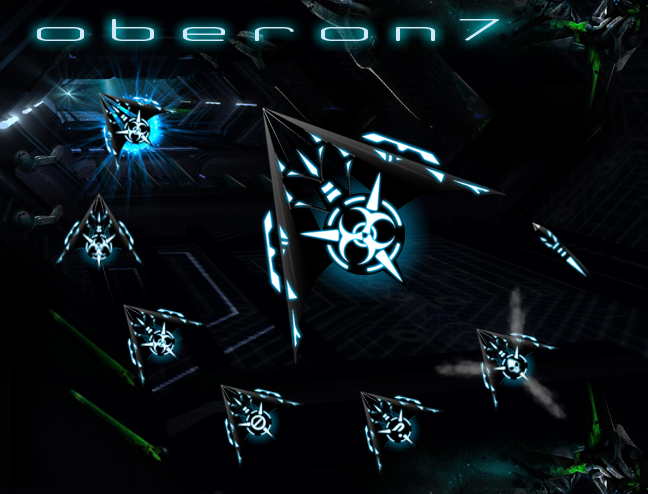
Piranha FX by neone6 and Oberon 7 by Vampthothika came in as the 2nd and 3rd most downloaded with over 7000 downloads each.

Curtains: How to Create Your Own Styles
Start from scratch or edit an existing one!
Thursday, January 21, 2021 by Tatiora | Discussion: Stardock Blog
One of Object Desktop’s greatest additions last year, Curtains lets you add new “modes” to Windows 10. With Curtains, you can customize the Start button, title bar buttons, and title bar, plus adjust hundreds of other small elements in Windows. You can be as specific and detailed as you want to be, or you can make broader, more subtle changes, whichever suits your preference best!
One of the things you can do with Curtains is create and share your own styles. I’m definitely not a style expert - I don’t really have much of an eye for design - but I wanted to walk through some of the options and possibilities that exist for people who are much more talented than myself.
For those of you who, like me, don’t see themselves as much of a design guru, the options that exist for editing existing styles are pretty great too, so don’t fret! On that note, let’s take a dive into Curtains customization and what we can do with it.

If you like being very specific with customization options, then you’ll love just how much tweaking is available to you in Curtains. I started exploring by opening up Curtains and selecting “Create New.” I then named my style, added a brief description and my username, and got started with it.
I discovered that I could pick an image to start with if I wanted to, and that Curtains would create frames from a background that I selected, adjusting the color scheme to pull colors from that image.

I could go even further beyond that and edit the image layer, too. I can add effects, being as wild or a subtle as I like (below is an example of the balloon effect). The effects also have sounds, so I can set the volume on that if I’m inclined not to mute it.

One of my favorite details in the editor - which you can do whether you’re adjusting an existing style or creating one from scratch - are Shadows. You can change the color of the shadow on your window, adjust the transparency and blur level, and even adjust how much shadow the window casts.

What I tend to prefer to do is pick a style that already exists and edit it to suit my tastes. A feature I almost always make sure to have turned on no matter what style I use is the background blur. To change this, I go into “advanced properties” on the style (I always make a copy, I never edit the original) and scroll down toward the bottom until I find “Explorer background blur mode.” I personally like the Acrylic Blur.

Below, you can see an example of an edited version of Dark Waters. I adjusted the colors (normally, I would definitely not be using pink, but I wanted to go for a dramatic effect here just so you can see), changed the shadows so that they would tint lavender, and applied it to my desktop.

Honestly, I genuinely like the base styles that come already included with Curtains. I’m usually perfectly content with just altering the colors to match the background I’ve chosen for my desktop and making sure I have the blur effect turned on.
Curtains, combined with DeskScapes, Fences, and Groupy have made my home PC very unique to me. I generally love blue and aqua tones, so it’s exciting for me to be able to apply that in lots of different places on my computer where I generally would be unable to otherwise.
Are you a fan of editing and creating styles in Curtains? If so, please share your tips with me!
Cool stuff at CES 2021
Last week's digital conference had a ton of neat announcements
Wednesday, January 20, 2021 by Tatiora | Discussion: Personal Computing
CES was alive and active this year, even if the format was just a little bit different. Completely virtual for 2021, the Consumer Electronics Show lived up to its name by showcasing many of the top names in tech - not to mention more than a few startups! - and playing host to plenty of exciting product launch announcements.
There's obviously so much for me to cover here so that I'll barely scratch the surface, but let's take a look at some of the things I thought were pretty cool that popped up during the conference last week!
AMD Keynote
AMD made some pretty big announcements last year and made big waves in the market with the Ryzen 5000 desktop processors and Big Navi graphics cards. As was to be expected, this year was no exception as Dr. Lisa Su, President and CEO of AMD, detailed what exciting things AMD has been working on and what's coming in 2021.
Stealing the show was the much-anticipated AMD Ryzen 5000 series of mobile processors. Based on the same Zen 3 architecture as the desktop CPUs, AMD promises incredible performance, longer battery life, and "the only 8-core x86 CPU for ultrathin laptops."
Dr. Su's keynote is linked above if you'd like to hear all of the details and start budgeting for your next PC. 
LG Rollable Smartphone

Image credit: LG
Rumors of a rollable smartphone have been circulating for awhile, but LG confirmed at CES that the phone is officially on its way. During their segment, LG showed a short teaser trailer which showcases a phone which can extend its edges to create a small tablet. Called the LG Rollable, the company confirmed that the phone will release sometime in 2021.
The tech is pretty cool, but I typically don't jump on the newest latest and greatest phones. Although no price has been confirmed, some leaks suggest that the price point may be around $2,300, and that's a little too steep for me! Anyone thinking about getting this gadget at launch? I want to hear about it if you do!
AARP Innovation Lab
AARP is a United States–based interest group focusing on issues affecting those over the age of fifty, and this year at CES they sponsored presentations from several start-up companies who are focused on making life easier for the aging population. There is so much that tech can do for seniors and their caregivers, and it was AARP's goal to shed some limelight on these types of innovations.
One of the main goals was to focus on tech that helps elderly people "age in place" - in other words, the hope is to keep them in their homes and communities rather than in a nursing home. An app called Mighty Health pairs seniors with health coaches and certified trainers, for example, while another startup, Zibrio, features a scale that assesses users' balance to predict whether or not they are fall risks.
All of my grandparents are, sadly, gone, but a lot of these startups and their ideas really interest and intrigue me because I can see things that I sure wish I'd had access to while they were still alive. I found the smart lamp, Nobi, to be an especially enlightening (sorry not sorry!) idea: it automatically turns on when users stand up and sends alerts to family members in case they fall. You can learn more about it in the YouTube video I've embedded above.
There were plenty of other fantastic ideas showcased during the Innovation Lab, so if you have an aging senior in your life be sure to check out some of the tech that's being developed!
Airpeak Drone
Sony offered the first glimpse of its new flying machine at CES this year, showcasing the drone flying above a snowy landscape while keeping pace with a prototype Sony Vision S car during a road test. Unfortunately for drone hobbyists, the Airpeak is definitely meant for professional cinematographers, but Sony has left the door open for possible future iterations on the brand, which may include consumer drones, too.
The Airpeak is set to launch in the spring of this year. Any drone hobbyists out there? I want to hear about what you fly!
Everything Else
I know, this is kind of a broad sweeping "and all this other stuff," but really - there's so much to cover! Plenty of sites out there have some great summaries of the various aspects of CES and some of the major announcements that occurred over the week. There were new TVs and home theater innovations, new gaming laptops, new soundbars, and so, so much more.
Want to see more of what was announced at CES? Check out their website! Did you watch the conference at all this year? Tell me what you're excited about!
Valentine's Day Themes to Sweeten your Desktop!
Monday, January 18, 2021 by Island Dog | Discussion: WinCustomize News
Valentine's Day is approaching in a few weeks, and I thought it would be fun to feature some of the Valentine's Day inspired skins and themes here on WinCustomize.
Do you add Valentine's skins to your desktop?
Happy Valentines Day by vlad (Wallpaper)

Valentines Day by danilloOc (Start buttons)

Valentine Hearts by AzDude (Dream)

My Dirty Valentine by Vampothika (CursorFX)
